

A good Upwork proposal is short, specific to the job, and easy for the client to act on. For most projects, Upwork itself suggests keeping the cover letter to 200-300 words. You do not need a long life story, and you do not need reviews to write a decent proposal. You need a clear opening line, one piece of relevant proof, a short plan, and a simple next step. This article gives you three copy-paste templates you can adapt – one for a beginner with no reviews, one for creative work, and one for tech work – plus a line-by-line explanation of why each line works, what a proposal costs you in Connects, and the mistakes that waste your applications.
What is an Upwork proposal?
An Upwork proposal is your application for a job a client has posted. It is not just the message you write. According to Upwork Help, when you select Apply Now on a job post, you go through these steps: choose whether you apply as a freelancer or an agency, set your terms (your hourly rate, or your bid on a fixed-price project and whether you are paid by project or by milestone), estimate how long the project will take, write your cover letter, answer any screening questions the client added, add work samples or link items from your profile, decide whether to boost your proposal with extra Connects, and then review and press Send.
| Part of the proposal | What it is | Required? |
|---|---|---|
| Terms | Your hourly rate or your fixed-price bid, and milestones if you use them | Yes |
| Timeline | How long you expect the project to take | Yes |
| Cover letter | Your message to the client | Yes, unless the job uses a video interview |
| Screening questions | Questions the client added to the job post | Only if the client added them |
| Samples and highlights | Attachments, or items linked from your profile such as past jobs, portfolio pieces and certificates | Helpful, and often expected |
| Boost | Extra Connects to appear near the top of the proposal list | No, optional |
Two things beginners often miss. First, some job posts ask for a recorded video interview with Uma, Upwork’s AI interviewer, instead of a cover letter. Second, you may be asked to confirm your identity when you start a proposal, as part of Upwork’s Know Your Customer process. Both are normal parts of the platform, not signs that something went wrong.
What the client actually sees first
Before you write a single line, understand how your proposal looks from the client’s side. The client first sees only the opening lines of your cover letter in the proposal list, along with your name, profile photo, talent badges, hourly rate, and Job Success Score. They decide from those few lines whether to open your full proposal at all. That is why the first two lines matter more than the rest of the letter combined. A generic opening such as “Hello, I read your job description and I am confident I can complete this project” tells the client nothing, and it looks exactly like the fifty other proposals they received. A good opening names the client’s actual problem in your own words.
Weak opening: “Hello, I am a hardworking freelancer and I can do this job perfectly.”
Strong opening: “Your product pages need short descriptions that help shoppers decide quickly. I write product descriptions for small online stores, and I can start with your ten best-selling items this week.”
The strong version works because it repeats the job back to the client in plain words, names a concrete first step, and shows the writer actually read the post. Everything in the templates below follows this same idea.
The 5-part structure every template follows
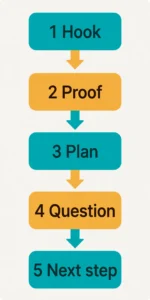
Every strong Upwork cover letter follows the same five moves, in this order. Keep the whole letter short enough to read on a phone in under a minute.
| Part | What to write | Why it matters |
|---|---|---|
| 1. Hook | One or two lines naming the client’s problem or goal | This is all the client sees before deciding to open your proposal |
| 2. Proof | One relevant example of similar work, with a concrete detail | One real example beats five vague claims about your skills |
| 3. Plan | Two or three short steps showing how you would do the work | It shows you have thought about the job, not just the payment |
| 4. Question | One useful question about the project | It starts a conversation and shows you read the brief carefully |
| 5. Next step | A simple suggestion, such as a short call or a look at your sample | It makes replying easy for the client |
If you are new and have no client work to show, your proof can be a practice project, a personal project, or a sample you made for this exact type of job. Say clearly what it is. A sample you made yourself is honest proof. A fake client name or an invented result is not.
Template 1: Beginner with no reviews
Use this template when you are new to Upwork and have no reviews yet. It works for writing, data entry, virtual assistance, and other general work. Replace every [bracketed part] with your own details, and delete the brackets before sending.
Hi [Client Name],
Your job post mentions [the specific task, in your own words – for example, “writing 20 short product descriptions for your online store”]. I can help with that. I have been building my skills in [your skill] for [time period], and I recently completed [a practice project or personal project – for example, “descriptions for a sample store of 15 products, which you can see in the attached sample”].
Here is how I would start: first, I would go through your [existing content or product list] and note the tone and details that matter to your buyers. Then I would draft the first [number] items and share them with you early, so you can check the style before I continue. Finally, I would complete the rest in [your timeline] and revise anything that does not fit.
One question before I begin: [ask one useful question – for example, “Do you have a style guide or a favourite product page I should match?”]. I am available [your working hours or start date], and I would be glad to do a short call to discuss the details.
Thank you for considering my proposal.
[Your Name]
Why these lines work
- The opening repeats the job back. It proves you read the post instead of sending the same message to every job.
- The proof is honest about being new. A practice project is presented as a practice project. Clients respect that far more than invented experience.
- The plan has three steps and a checkpoint. Sharing the first few items early removes the client’s biggest fear: paying for a full batch of work in the wrong style.
- The question is useful, not filler. Asking about a style guide shows you care about matching their brand, and it gives the client something easy to answer.
Template 2: Creative work (design, video, or content)
Use this template for logo design, social media creatives, video editing, or similar work. For creative jobs, your sample matters more than your words, so the template points the client to it early.
Hi [Client Name],
Your [Instagram posts / YouTube thumbnails / logo] need a cleaner, more consistent look, and that is exactly the work I do. I have attached [two samples that match this job most closely – for example, “two Instagram carousel designs for a food brand”]. You can see my full portfolio here: [portfolio link].
For this project, I would start with [one draft or concept] so you can see the direction before I build the full set. Once you approve the style, I would deliver the remaining [number] designs in [your timeline], in the file formats you need – for example, PNG for posting and the editable source file for future changes.
One question: [for example, “Do you already have brand colours and fonts, or should I suggest a palette based on your current posts?”]. I can start [your start date] and I am happy to adjust the first draft until it feels right.
Thank you for your time.
[Your Name]
Why these lines work
- The sample comes in the second line. Creative clients judge by the work, so do not make them read three paragraphs before they see it.
- One draft first, then the full set. This lowers the client’s risk and shows a professional working method.
- File formats are named. Small details like this signal that you have delivered real work before, even if your reviews are still zero.
Template 3: Tech work (web development or WordPress)
Use this template for WordPress, website fixes, or small development tasks. Clients for tech jobs care about what you will check first and how you will avoid breaking their live site.
Hi [Client Name],
Your [website / WordPress site] needs [the specific problem – for example, “a faster homepage and a contact form that actually delivers enquiries”]. I work with [WordPress / your main tool], and I recently [a relevant example – for example, “rebuilt a small business homepage and fixed its contact form, which you can see in the attached screenshots”].
Here is my approach: first, I would take a full backup and check the current setup, so nothing is lost while I work. Then I would fix [the main problem] and test it on [desktop and mobile] before handing it back. Finally, I would send you a short note explaining what changed, so you can manage it yourself later.
One question: [for example, “Is the site currently live and taking enquiries, or can I work on it directly?”]. I can start [your start date] and I am available [your working hours] for a quick call if that helps.
Thank you for considering my proposal.
[Your Name]
Why these lines work
- Backup comes first. It answers the client’s unspoken worry – that a freelancer might break a working site.
- Testing is mentioned, not assumed. Saying you will test on desktop and mobile shows you think about the visitor, not just the code.
- The handover note is a bonus. Clients remember freelancers who leave them able to manage their own site.
Worked example: how Template 1 looks when filled in
The example below is hypothetical. It is only meant to show how a template changes when you fill it in for a real-looking job post. The person, the job post, and the numbers are illustrative, and no result is promised.
The fictional job post: A small business in Jaipur sells handmade soaps online and needs 20 short product descriptions for its website. Budget is fixed-price, and the client wants a friendly tone that explains each soap in plain words.
Rohan, a beginner content writer from Jaipur, fills in Template 1 like this:
Hi Meera,
Your handmade soaps need short descriptions that help a shopper choose in seconds. I write product descriptions for small online stores, and I recently wrote descriptions for a sample store of 15 skincare products, which you can see in the attached sample.
Here is how I would start: first, I would read your current product pages and note the ingredients and benefits that matter to your buyers. Then I would draft the first five descriptions and share them with you early, so you can check the tone before I continue. Finally, I would complete the remaining fifteen in four days and revise anything that does not fit.
One question before I begin: do you have a list of ingredients for each soap, or should I work from your current product pages? I am available to start tomorrow, and I would be glad to do a short call to discuss the details.
Thank you for considering my proposal.
Rohan
Notice what changed: the client’s name, the exact product, the sample that matches the job, a real timeline of four days, and a question the client can answer in one line. Nothing else in the template needed changing. That is the whole point of a template – it saves you from a blank page, but the details still have to come from the actual job post.
How to adapt a template to any job in 10 minutes
Sending a template word for word is almost as bad as sending nothing. Clients can tell when a proposal was written for a different job. Use this checklist before you press Send, and it will take about ten minutes per job.
- Read the job post twice, and underline the one problem the client cares about most.
- Rewrite the first two lines in your own words so they name that problem.
- Pick the one sample that matches this job best, and remove the rest.
- Replace every [bracketed part] and check that no brackets remain.
- Answer every screening question directly, in plain words.
- Check your rate, timeline, and the number of Connects the job needs before you send.
- Read the whole proposal once out loud, and fix anything that sounds copied.
What a proposal costs you: Connects and fees
A proposal is not free. Upwork charges Connects, its proposal tokens, every time you submit one. The number of Connects a job needs varies, and the job post shows the exact number before you apply, so check it before you spend them. Each Connect costs $0.15. A Freelancer Basic account is free and includes 10 Connects a month. The optional Freelancer Plus plan costs about $19.99 a month and includes 100 Connects.
| Cost | What you pay | When it applies |
|---|---|---|
| Connects | $0.15 each | Every proposal you send |
| Free Connects | 10 per month on Freelancer Basic | Monthly, included in the free plan |
| Freelancer Plus | About $19.99 per month, includes 100 Connects | Monthly, only if you upgrade |
| Freelancer service fee | 0-15% of each payment, set per contract | Every time a client pays you |
The service fee deserves a clear note. Since 1 May 2025, Upwork charges a variable freelancer service fee of 0-15% per contract, and the exact rate is shown to you before you submit a proposal or accept an offer, then locked for that contract. Most freelancers pay around 10% on typical contracts, but do not plan your rate on a flat 10% promise. Always check the fee shown on the specific job before you bid, because that is the number that decides what you actually receive. Upwork shows a “You will Receive” figure when you set your bid, which already subtracts the service fee.
Because proposals cost real money, apply only where you are a strong fit. Before spending Connects on any job, it is worth checking the post itself. Our guide on how to spot fake Upwork job posts explains the warning signs, such as a client asking you to move to Telegram or WhatsApp before any contract, or a job that asks for free work as a test. There are no free test projects on Upwork, and asking for one is against the platform’s policy. If you are still finding your first client, our first client playbook lays out a 30-day plan that covers Upwork, LinkedIn, and local outreach together.
7 mistakes that waste your Connects
| Mistake | Why it hurts | What to do instead |
|---|---|---|
| Sending the same proposal to every job | The client can tell it was not written for them | Rewrite the first two lines for each job |
| Starting with yourself | “I am a hardworking freelancer” says nothing about the client’s problem | Start with the client’s goal |
| Writing a very long cover letter | Clients scan dozens of proposals and stop reading long ones | Keep it to 200-300 words for most projects |
| Claiming experience you do not have | One check of your profile or samples exposes it | Show a practice project and label it honestly |
| Ignoring screening questions | Unanswered questions signal carelessness | Answer each one directly and briefly |
| Applying to jobs you cannot do well | Each application costs Connects whether you win or not | Apply only where your sample matches the work |
| Agreeing to free work before a contract | Free test projects are against Upwork policy and often lead nowhere | Offer a small paid trial or a sample you already made |
After you press Send
Pressing Send is not the end of the proposal. A few rules from Upwork Help are worth knowing. You can edit most parts of a proposal up to six hours after submitting it, or until the client has viewed it, so proofread quickly and fix typos while you still can. Do not repeatedly message a client who has not replied; contacting a client again and again before a contract begins goes against Upwork’s Terms of Service. If the client replies, keep the conversation inside Upwork Messages until a contract exists. Moving to personal email, Telegram, or WhatsApp before a contract is one of the classic signs of a fake client, and our guide to red flags that mark a risky client explains the rest of them.
If you win the job, the work is only beginning. A short onboarding routine – confirming the scope, the deadline, and how you will share progress – prevents most first-project misunderstandings. Our client onboarding checklist covers exactly that, step by step. And if you are still at the very start of freelancing, the freelancing beginner guide explains how to set up your profile, pick a skill, and find your first jobs in India.
Frequently asked questions
Can I get work on Upwork with no reviews?
Yes, every freelancer starts with zero reviews. What matters is a proposal that names the client’s problem, a sample that matches the job, and a profile that is complete. Small fixed-price jobs and clear samples help you win the first few contracts, and those contracts are what build your reviews.
How long should my Upwork proposal be?
Upwork suggests 200-300 words or fewer for most projects, in two to three short paragraphs. Shorter is fine for a simple job. The first two lines matter most, because that is all the client sees before opening your proposal.
Should I use a template for every proposal?
Use a template as a starting structure, never as a finished message. Change the opening lines, the sample, the plan, and the question for every job. A template saves you from a blank page, but the proposal still has to sound like it was written for that one client.
How many Connects does a proposal cost?
It varies by job, and the job post shows the exact number before you apply. Each Connect costs $0.15, and a free Freelancer Basic account includes 10 Connects a month. Check the number on each job before you apply, and spend Connects only on jobs you can genuinely do well.
What to do next
Pick one template from this article and adapt it for one real job post today, using the 10-minute checklist above. Do not send it until every bracket is replaced and the first two lines name the client’s actual problem. One careful proposal teaches you more than ten copied ones.
If you want a guided path beyond single proposals, the Income Builder program at Padhaku teaches freelancing implementation step by step, including profiles, proposals, and client handling. Start with the first client playbook linked above, and build from there one proposal at a time.
About Padhaku
Padhaku is an India-focused digital skills learning platform founded by Anubhav Shukla. It focuses on making practical digital education more accessible to learners. Padhaku publishes step-by-step guides on freelancing, digital marketing, SEO, and online earning, written for Indian beginners who want skills they can actually use.
Sources and further reading
- Upwork Help, “How to submit a proposal on Upwork” – https://support.upwork.com/hc/en-us/articles/211062998 (checked 23 November 2026)
- Upwork, “Cover Letter Tips: Samples and Examples” – https://www.upwork.com/resources/cover-letter-tips/ (checked 23 November 2026)
- Upwork, “How To Create a Proposal That Wins Jobs” – https://www.upwork.com/resources/how-to-create-a-proposal-that-wins-jobs (checked 23 November 2026)
- Upwork, “How To Bid for Jobs on Upwork” – https://www.upwork.com/resources/how-to-bid (checked 23 November 2026)