
Yes, WhatsApp outreach can win a beginner freelancer their first local clients in India. The honest version is simple: send a short, specific one-to-one message to a local business you have actually looked at, offer a small free check of their online presence, and then move the conversation to a call. It is not bulk messaging, it is not a shortcut, and it does not replace doing good work. This article shows the rules first, then the setup, the niches, the exact message flow, and a two-week plan to try it.
If you are starting from zero, read this together with our 30-day first-client playbook, which covers the full journey from no clients to a first paying project. This article covers one channel inside that plan in full detail: WhatsApp.
First, the rules: what WhatsApp actually allows
Learn the limits before you write a single message. WhatsApp is strict about bulk messaging, and a banned number costs you the channel and the contacts on it. The rules below come from WhatsApp’s own Help Center and from Meta’s published messaging policy, checked 24 November 2026.
Broadcast lists hold 256 contacts, and only reach people who saved your number
A broadcast list lets you send one message to many contacts, and each person receives it as a private chat from you. WhatsApp’s Help Center states that a list holds up to 256 contacts, and that every contact in the list must have saved your number in their address book. Only people who have added you to their contacts receive the message. Broadcast lists are not supported on Windows, Mac or Web, so this is a phone-app feature only.
For a freelancer, that has one clear meaning: a broadcast list is a follow-up tool for people who already know you, not a cold-outreach tool. A stranger who never saved your number will simply never receive your broadcast.
Bulk tools and bought lists get numbers banned
WhatsApp’s Terms of Service do not allow bulk messaging, auto-messaging or automated use of the normal app. Unofficial bulk sender tools, modified apps and scripts break those terms, and WhatsApp may disable the accounts that use them. There is no reliable appeal after a ban, so the risk is not worth it for a beginner whose whole business runs on one number.
The official route for sending at scale is the WhatsApp Business Platform, also called the API. On the API, a business sends Meta-approved template messages to people who opted in, and Meta sets a messaging limit that starts near 250 unique customers per 24 hours for a new number and rises to 2,000 after business verification, then higher as message quality holds. That is a tool for later, once you have real clients and an opted-in list. It is not what you need for your first ten clients.
Opt-in and Indian law, in plain words
Meta’s Business Messaging Policy says you may contact people on WhatsApp only if they gave you their number and agreed to receive your messages. A past purchase is not consent to receive marketing messages, and every request to stop must be honoured. India’s Digital Personal Data Protection Act, 2023 treats phone numbers as personal data to be used with consent for a stated purpose, and people can withdraw that consent. This is general information, not legal advice.
For your outreach, the practical line is this: message the number a business itself publishes for customer enquiries, write like a genuine enquiry rather than an advertisement, name one specific thing you noticed about their business, and stop at the first no. That is how the channel is meant to be used.
The free app and the API, side by side
| Feature | WhatsApp Business app (free) | WhatsApp Business API (Platform) |
|---|---|---|
| Cost | Free | Pay per delivered marketing template message; Meta’s India rate card lists about Rs 0.86 per marketing message, so check the current rate card before you budget |
| Reach per send | Up to 256 contacts per broadcast list, and only people who saved your number | Opted-in customers, saved or not; limits start near 250 unique customers per 24 hours and rise with verification and quality |
| First message | Free-form chat | Approved template outside the 24-hour customer service window |
| Best for | One-to-one chats and follow-ups with warm contacts | Larger campaigns once you have a real opted-in list |
Sources: WhatsApp Help Center, “How to use broadcast lists”, checked 24 November 2026; Fast2SMS, “Is Bulk WhatsApp Legal in India?”, checked 24 November 2026.
Set up WhatsApp Business before you message anyone
A business owner who receives your message will check your profile before replying. If it looks like a personal account with no business details, most will ignore it. Set up the free WhatsApp Business app properly first. It takes about 30 minutes.
- Business profile: your real name or business name, the service you offer, your city, your working hours, an email address, and a link to your portfolio or Instagram page. Use a clear photo of yourself or a simple logo, not a stock photo of someone else.
- Catalogue: add three to five services with a plain description and a starting price for each. A catalogue answers the owner’s first question, which is what you do and what it costs, without a long chat.
- Labels: create labels such as New Lead, Replied, On Call, Client and Not Interested. Label every contact the day you message them, so follow-ups never depend on memory.
- Quick replies: save short answers for the questions you will get again and again, such as your services, your prices and your availability. Edit each quick reply to fit the person before you send it.
- Greeting and away messages: a short greeting for first-time chats, and an away message that states when you will reply. Both save you from losing a warm lead while you are busy.
- Keep business and personal chats apart: use a separate number for business if you can. Mixing client chats with family groups is how messages get missed and how a client sees a personal status update you never meant to share.
Find 50 local businesses worth messaging
Good outreach starts with a good list. Aim for 50 businesses in two or three niches, all in or near your city. Fifty is enough to learn what works, and small enough to research each one properly.
- Search Google Maps for your niches, such as “salon in Nagpur” or “dental clinic near me”. Open each listing and check whether it shows a WhatsApp button, recent photos, and replied-to reviews. A business with an incomplete profile is a business you can help.
- Check Justdial and Sulekha listings for the same niches. These list phone numbers that businesses published for customer enquiries, along with services and areas served.
- Look at Instagram pages for local businesses. A page that has not posted in months, or has no link in its bio, tells you exactly what to offer.
- Walk your own neighbourhood. Shop boards, clinic nameplates and salon windows carry phone numbers, and a business you have seen with your own eyes is easier to write about specifically than one you only found online.
- Track everything in a simple sheet: business name, niche, contact name if you can find it, the number and where you found it, the date you messaged, their reply, and the next step. Never buy a number list. A bought list has no consent behind it, and the people on it never asked to hear from you.
Message only the number the business itself publishes for customers. That is the number they chose for enquiries, and it is the only number you have any business writing to.
10 local-business niches and what to offer each
Pick niches where the owner makes decisions quickly and where a small online fix is visible within days. The table below gives one realistic starting service per niche for a beginner. Offer one thing well, not five things vaguely.
| Niche | What they usually need | A service you can offer as a beginner |
|---|---|---|
| Beauty salons and parlours | Regular offers, appointment reminders | Instagram posts and Google Business Profile updates |
| Dental and skin clinics | Appointment bookings, trust | Google Business Profile setup, review replies, a simple one-page website |
| Gyms and fitness studios | Membership enquiries, class schedules | WhatsApp catalogue of plans, Instagram content plan |
| Restaurants and cafes | Orders, daily menus, reviews | Menu photos, Google Business Profile posts, food-delivery listing check |
| Coaching classes and tutors | Admission enquiries | Admission enquiry replies, fee-structure PDF, Instagram page setup |
| Real estate agents | Site-visit bookings | Listing photos, WhatsApp broadcast list for new listings |
| Jewellers and boutiques | Festival offers, new collections | Catalogue on WhatsApp, festival offer creatives |
| Home services (plumbers, electricians, cleaners) | Job bookings | Google Business Profile, a missed-call follow-up sheet |
| Pharmacies and clinics | Medicine orders, timings | WhatsApp ordering message templates, Google profile upkeep |
| Bakeries and home food businesses | Orders, festival menus | Order form, menu catalogue, Instagram page |
The outreach flow: intro, free audit, call
One message does not win a client. A short flow does: a specific first message, a free audit, then a call. Each step earns the next one, and each step is small enough that the owner can say yes without thinking hard.
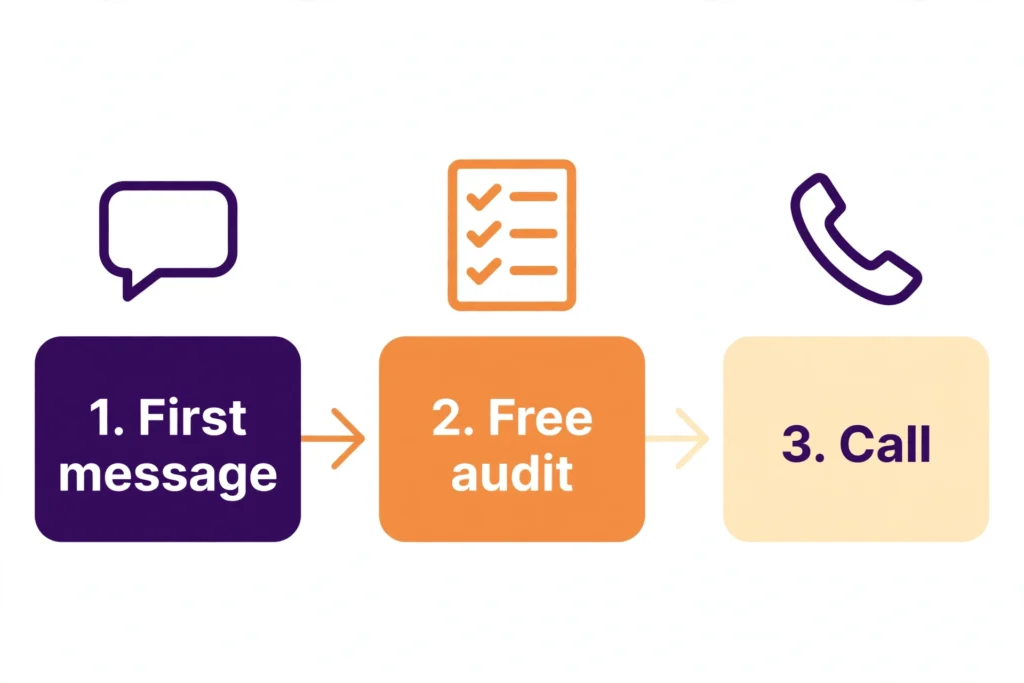
Step 1: The first message (under 60 words, specific, no pitch in line one)
Write the message after you have looked at the business, and put the specific thing you noticed in the first two lines. The template below is a starting point to adapt in your own words, not a script to copy blindly.
“Hello [Name], I found [Business Name] on Google Maps while looking for [salons] in [City]. I noticed your Google profile has no photos from the last three months, and your Instagram link is missing. I help local businesses fix exactly this. May I send a free five-point check of your online presence? No charge, no obligation. – [Your name], [City]”
Notice what the message does not do: it does not list your services, it does not quote a price, and it does not ask for a meeting. It asks permission to send something useful. That is the whole job of a first message.
Step 2: The free audit (15 minutes, sent as a short note)
When the owner says yes, spend 15 minutes checking their online presence and send the findings as a short WhatsApp note, not a long PDF report. A short note gets read. A report gets saved for later and forgotten.
- Is the Google Business Profile claimed, with the correct phone number, hours and address?
- Are there recent photos, from the last three months?
- Are customer reviews replied to, including the unhappy ones?
- Does the WhatsApp button on the profile actually open a chat?
- Does the website or Instagram link work, and does it show the same business name and phone number?
- Is there a clear list of services and prices, or must a customer ask for everything?
- Does the business appear when you search its own name plus the city?
- Is there one obvious next step for a customer, such as a call button, a booking link or a menu?
End the audit with one line: “I can fix the top three items this week for Rs [your price]. Shall we talk for 15 minutes tomorrow?” One offer, one price, one next step.
Step 3: The call (15 minutes, five questions)
The call is not a sales pitch. It is five questions, then silence while the owner answers. Ask: what brings most customers today; what do you want more of; who handles your online work now; what would a good month look like; and what budget have you kept aside for this? Then quote in writing, with scope, price and timeline, and ask for a small advance before you start. Our advance payment fraud checks explain what to confirm before you start work without clear payment terms.
Two follow-ups that do not annoy anyone
Most replies come after a follow-up, not after the first message. Send one polite follow-up after three days, and one more after a week. Then stop and move on. Chasing the same business five times in two days burns the relationship and your reputation in a small market.
Follow-up after three days: “Hello [Name], just checking if you saw my message about the free five-point check for [Business Name]. Happy to send it today, or I can leave you alone if the timing is wrong. – [Your name]”
Follow-up after the audit, no reply: “Hello [Name], I sent the five-point check on [day]. The quickest win is [one specific fix, such as adding your Diwali photos to your Google profile]. Shall I do just that one for Rs [price], or would you rather I close this for now? – [Your name]”
A worked example: Meera from Nagpur
This is a hypothetical example shared only to explain the idea. The person, the business names and the numbers are illustrative, and actual results may differ.
Meera is a fictional beginner in Nagpur. She offers Instagram and Google Business Profile help to salons and boutiques, two niches she understands because she has bought from them herself. In week one she lists 50 businesses from Google Maps and Instagram, and checks each one against the audit list above. In week two she sends ten first messages a day, five days a week, each one naming a specific thing she noticed.
Out of 50 messages, 14 owners reply, six ask for the free audit, and three agree to a call. One boutique owner hires her for one month of Google profile and Instagram work at Rs 3,000. The numbers are illustrative arithmetic to show how the funnel works: 50 messages, 14 replies, six audits, three calls, one client. They are not a promise, not an average, and not a result any real person achieved. The point is the shape of the funnel, not the figures in it. A beginner with a different niche, city or offer will see different numbers, and that is normal.
From chat to call to first client
The chat is only the beginning. What turns it into a client is everything that happens after the owner says yes.
- Quote in writing: scope, price, timeline and what is not included. A written quote protects both sides, and it is the first thing a serious business owner expects. Read our guide on how much to charge as a beginner freelancer before you name a price.
- Take a small advance: agree the advance before you start, not after the work is done. A business that will not pay a small advance is telling you something about how the rest of the project will go.
- Onboard properly: once they say yes, use a client onboarding checklist so nothing is missed in the first 48 hours: access to accounts, a single point of contact, agreed timings, and how you will report progress.
- Ask for a review only if the work earns it: after the first month, if the client is happy, ask whether they would write a short review on your Google profile. Never invent a testimonial, and never write one yourself and ask a client to sign it.
Mistakes that kill replies
| Mistake | Why it hurts |
|---|---|
| Sending the same message to 50 numbers at once | It reads as spam, invites reports, and risks a ban |
| Pitching your service in the first line | The owner has no reason to trust you yet |
| Messaging numbers from a bought list | No consent behind it, and it breaks both policy and the consent principle in Indian law |
| Using a bulk sender tool | It breaks WhatsApp’s terms, and the number can be disabled |
| No business profile or portfolio | The owner cannot check who you are, so they ignore you |
| Following up five times in two days | Pressure kills trust, especially in a small local market |
| Promising “100 customers in a week” | No honest freelancer can promise that, and the owner knows it |
A two-week practice plan
This is a suggested practice schedule, not a guarantee of clients in 14 days. It shows the pace, not a promise.
| Days | Do this | Check this |
|---|---|---|
| Day 1-2 | Set up WhatsApp Business, pick two niches, write your first-message template | Profile complete, catalogue has three services |
| Day 3-4 | List 50 businesses in your sheet, with the specific thing you noticed for each | Every row has a real observation, not a blank cell |
| Day 5-7 | Send ten first messages a day, each personalised | Replies, and which opening line got them |
| Day 8-10 | Send the free audit to everyone who replied yes, and follow up once with the rest | How many audits turned into a call request |
| Day 11-12 | Take the calls, ask the five questions, send written quotes | Which objection came up most, and how you answered it |
| Day 13-14 | Start the first project, or review the list and pick a better niche | What to change in the message, the niche, or the offer |
Common questions
Do I need the WhatsApp Business API to start?
No. The free WhatsApp Business app is enough for one-to-one outreach and follow-ups. The API becomes useful only when you have a real opted-in list and a volume of messages the app cannot handle. Start with the app, and let the API wait until you have clients.
Is it legal to message a business on WhatsApp?
Messaging a business on the number it publishes for customer enquiries, with a genuine enquiry and an easy way to opt out, is how the channel is meant to be used. Bulk marketing to people who never agreed to hear from you is a different thing, and that is what the policy and the law restrict. When in doubt, keep the message short, specific and easy to decline.
What if nobody replies?
Check four things before you conclude the channel does not work: is your profile complete, does each message name something specific, are you messaging during business hours, and is your offer something the niche actually wants? Silence is data. Change one thing at a time, such as the niche or the offer, and test again with the next ten messages.
How many first messages should I send a day?
Start with ten a day, all personalised. Ten good messages beat fifty copied ones, because a copied message is easy to spot and easy to ignore. Ten a day also keeps you inside normal human behaviour on the app, which is the safest place to be.
Should I message at night?
No. Message during business hours, when the owner is at the shop and in work mode. A message at 11 pm reads as careless, and it is the kind of message that gets reported.
Your next step
Pick one niche today, list ten businesses, and send three first messages tomorrow morning during business hours. Then review what came back, fix the weakest line in your message, and send ten more. If you want the same first-client method on a platform instead, our Upwork proposal templates show the other side of the same goal. And if you want the full first-client system behind this article, see how the Income Builder program teaches implementation.
About Padhaku
Padhaku is an India-focused digital skills learning platform founded by Anubhav Shukla. It focuses on making practical digital education more accessible to learners.
Sources and further reading
- WhatsApp Help Center, “How to use broadcast lists”: https://faq.whatsapp.com/861663048350950/ (checked 24 November 2026)
- Fast2SMS, “Is Bulk WhatsApp Legal in India?”: https://www.fast2sms.com/help/is-bulk-whatsapp-legal-india/ (checked 24 November 2026)
- WABB, “WhatsApp Business Broadcast: Lists, Limits and Cost”: https://wabb.in/blogs/whatsapp-business-broadcasts (checked 24 November 2026)