

Yes, a beginner in India with no Upwork history can set up a profile that clients take seriously. Your profile is the first thing a client sees when you send a proposal, and it is also how clients find you in search. You do not need past Upwork jobs to start. Upwork asks for four things before you can apply for work: a profile photo, an overview, at least one employment history item, and at least one skill. This article tears down each part of the profile in order, shows a real before-and-after rewrite, explains what Upwork charges, and ends with a checklist you can use to check your own profile before you send your first proposal.
Padhaku teaches practical digital skills for Indian learners, and freelancing is one of the paths our readers ask about most. If you are starting from zero, read this together with our beginner freelancing guide for India, which covers how to pick a skill and find your first work. This article covers one piece of that journey in full detail: the Upwork profile itself.
Before you build: the account, the ID check, and the review
Creating an Upwork account is free. You sign up with Google, Apple, or an email address, choose “Work as a freelancer”, and add your name, password, and location. Upwork then walks you through a short set of questions about your experience. Those answers are not shown to clients. They help Upwork point you to the right guidance while you build the profile.
Two things catch beginners by surprise, so get them done early. First, identity verification. Upwork asks you to verify your identity with a government-issued photo ID. Unverified accounts cannot keep sending proposals, so do this as soon as your account asks for it rather than after you have written ten proposals. Second, profile review. Upwork reviews new freelancer profiles before they go live, and approval is not automatic. Profiles in oversaturated categories are sometimes not approved, which is one more reason to pick a narrow skill and write a specific profile instead of a generic one that says you do everything.
A complete profile also matters for visibility. Upwork says a polished, 100 percent complete profile gives you better visibility in search and eligibility for talent badges. You can start applying once the four minimum items are in place, but finishing the rest of the profile is worth doing before you spend Connects on proposals. The diagram below shows the nine parts this article covers, in the order a client reads them.
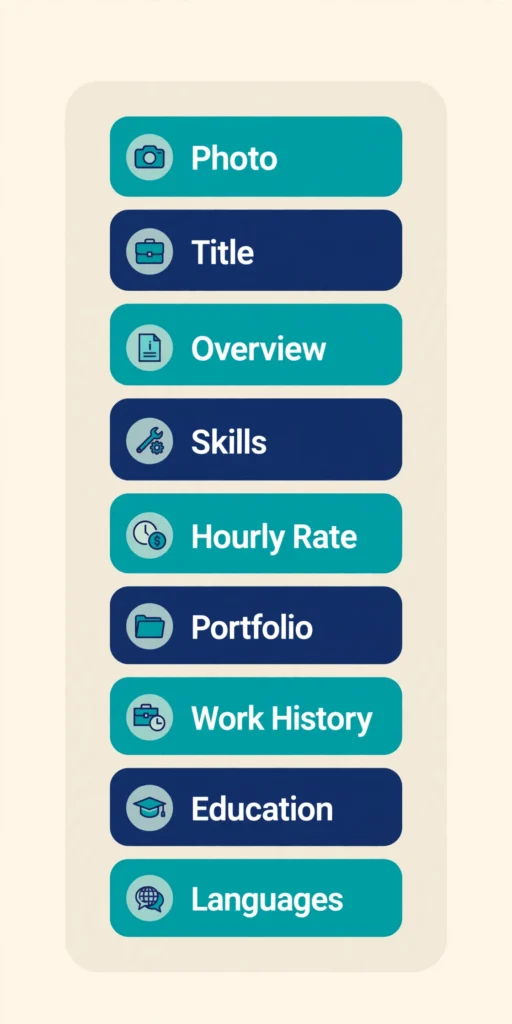
The profile, part by part
1. Photo: a real, clear headshot of you
You must upload a profile portrait photo before you can start submitting proposals, and it must be an actual picture of you. That rule exists for identity verification as well as for trust. Upwork says clear headshot-style photos work best. Sunglasses, logos, clip art, group pictures, and digitally altered images are not allowed.
Take it against a plain wall in daylight, face the camera, and crop it to your face and shoulders. You do not need a studio. A phone photo in good light beats a filtered or cropped group photo every time. Clients decide in seconds whether a profile feels real, and the photo is the first test.
2. Title: name the service and the result, not just the job
Your title is the first line a client reads, and Upwork calls it your first impression. Upwork’s own advice is to be descriptive about the services you offer, highlight your primary talents instead of listing every skill, and keep the title short and eye-catching.
Weak titles describe a job. Strong titles describe a service and a result. “Content Writer” tells a client nothing. “Blog Writer for Indian SaaS Brands” tells a client who you write for. “Social Media Designer for Small Indian Brands” is better than “Graphic Designer”, because a client who runs a small brand can see themselves in it. Pick one service, one audience, and write the title around them. You can change the title later as your work changes.
3. Overview: the first 250 characters do the heavy lifting
The overview is the short paragraph under your title, and it sets the tone for the whole profile. Only the first 250 or so characters appear in the freelancer search results list, so the opening lines matter more than the rest. Put the most important sentence first: what you do, who you do it for, and what the client gets.
A good overview answers three questions in order. What do you deliver? Who is it for? What happens next? Write it about the client’s problem, not about yourself. “I help small Indian brands post consistently on Instagram with designs that match their products” is stronger than “I am a hardworking and passionate designer looking for opportunities”. The first tells the client what changes for them. The second tells them nothing they can check.
Never include your email address, phone number, or any other contact information in your overview or anywhere else in your profile. Upwork forbids it, it opens you up to fraud and unwanted contact, and it is one of the fastest ways to get your account in trouble. Keep every conversation inside Upwork until a contract exists.
4. Categories and experience level: narrow beats broad
You can select up to four service categories when you create your account, and your profile appears in those categories when clients search them. You can still submit proposals in any category, so the categories are about where clients find you, not what you are allowed to apply for. Choose the categories that match your strongest, most specialised service.
Your experience level is set in Profile Settings, and the options are Entry Level, Intermediate, or Expert. Be truthful. Upwork warns that overstating your experience sets expectations you cannot meet, and that damages your reputation faster than starting at Entry Level ever will. Most Indian beginners should pick Entry Level and let the profile, the portfolio, and the first reviews do the talking. Clients filter for entry-level freelancers on purpose when the budget is small and the work is well defined.
5. Skills: up to 15, in the right order
You can add up to 15 skills, and the order you choose is the order they appear on your profile. Pick the skills clients actually type into job posts: “Canva”, “Instagram marketing”, “WordPress”, “data entry”, “video editing”, rather than vague words like “hard worker” or “fast learner”. Use the exact English spelling Upwork suggests when you type the skill name. If a skill does not appear, try a synonym or a slightly less specific term.
Put your strongest and most searched skill first, and do not fill all 15 slots with near-duplicates of the same skill. Five honest, relevant skills beat fifteen padded ones, because a client who hires for one skill reads the first three and stops.
6. Hourly rate: a starting point, not a promise
Your hourly rate is a starting point, not a fixed rule. Upwork says it gives clients a general sense of your pricing, helps them filter search results, and does not lock you into any one rate. You can update it at any time, and changing it does not affect your current contracts or proposals. Some freelancers adjust their rate per proposal. Others treat it as a baseline for negotiation.
For a beginner, the practical method is to look at what similar freelancers with your skill charge, then set your rate near the middle of that range, not at the very bottom. A very low rate does not win trust. It tells the client you do not value the work, and it leaves you no room to cover Upwork’s fee. Read our guide on how much to charge as a beginner freelancer in India before you pick a number, and remember that fixed-price projects let you quote per project instead of per hour.
7. Portfolio: show the work, even before you have clients
The portfolio is where a beginner profile wins or loses. Clients want proof, and a profile with no samples asks them to take your word for it. The fix is simple: make three to five sample pieces for imaginary or real small businesses, and label them clearly as samples. A designer can redesign a local shop’s Instagram posts. A writer can write two blog posts for a made-up brand. A video editor can cut a 30-second reel from free stock footage. What matters is that the work is yours and it shows the skill you are selling.
Never put other people’s work in your portfolio. Taking credit for work by others violates Upwork’s Terms of Service. Never present a sample as a paid client project when it was not one. A short note under each piece, saying what the piece is and what you did in it, is more convincing than a silent gallery.
8. Employment history, education, and languages
Your employment history is how you build credibility without Upwork jobs. Upwork lets you add up to 100 entries, and its own advice is to include student jobs, internships, and volunteer experience, plus freelance work you did outside Upwork. Your Upwork contracts appear in your work history automatically once you have them. List the history that relates to the work you want, and in each entry say what skill the job taught you, not just the job title.
Education works the same way. Add your degrees or diplomas, a short note on relevant coursework, and any awards or societies that matter. If you studied a subject but did not graduate, Upwork says you can include that too. For languages, you must state your English proficiency when you create the profile. Assess yourself honestly, because overstating it shows up in the first client call. If English is not your first language, you can become English-verified on Upwork with an approved test, such as a Duolingo English test, and add the certificate to your profile.
9. The optional extras: video intro and availability badge
Upwork lets you add a short video introduction to your profile, and it is worth doing once the written profile is solid. Sixty seconds is enough. Say your name, your service, who you help, and one sentence about how you work. Record it in a quiet room, look at the camera, and do not read from a script on screen. A clear video answers the trust question faster than another paragraph can.
There is also an Availability Badge, which you pay for with Connects while it is switched on. It is optional, and a beginner does not need it on day one. Spend your first Connects on proposals, not on promotion, and revisit the badge after your first few jobs.
Before and after: a beginner profile rewritten
This is a hypothetical example to show the method. Kavya is a fictional beginner from Lucknow who designs social media posts for small brands. She has no Upwork history and no paid clients yet. The table below shows her profile before and after the rewrite, with a note on why each change works. The person and the numbers are illustrative, and nothing here is a promise of results.
| Section | Before | After | Why it works |
|---|---|---|---|
| Title | Graphic Designer | Social Media Designer for Small Indian Brands | Names the service and the audience, so the right client stops scrolling |
| Overview, first line | I am a hardworking and passionate designer looking for opportunities to grow my career. | I design Instagram posts and reels covers for small Indian brands so their feed looks consistent and professional. | Describes the result for the client in the first 250 characters that search shows |
| Skills | Photoshop, hard worker, fast learner, communication, designing, creative, MS Word | Canva, Instagram post design, social media graphics, brand kit design, Hindi and English captions | Real skills clients search for, in order of strength, with no filler words |
| Portfolio | Empty | Five labelled samples: a redesigned Instagram grid for a Lucknow bakery, three festival sale posts, one reel cover set | Proof the client can judge, clearly labelled as samples, not fake client work |
| Hourly rate | $3 per hour | $8 per hour | Near the middle of what similar beginners charge, instead of a rate that signals low value |
| Employment history | Empty | College design society work, two volunteer posters for a local NGO, one paid logo for a family shop | Real experience a beginner actually has, showing the skill in use |
Notice what the rewrite does not do. It does not invent clients, earnings, or years of experience. It does not claim Kavya is an expert. It takes the real material she already has, a design skill, a few honest samples, and real volunteer work, and presents it in the client’s language. That is the whole job of a beginner profile.
What Upwork charges you, in plain numbers
Creating a profile is free. You pay in two places once you start working: the service fee on what you earn, and Connects when you apply for jobs.
The Freelancer Service Fee is variable, from 0 percent to 15 percent per contract. Upwork sets the percentage for each contract and shows it to you before you submit a proposal or accept an offer, and it stays fixed for the life of that contract. The old tiered fee system, 20 percent on the first $500, then 10 percent, then 5 percent, was retired in May 2025, so guides that still quote it are out of date. Many contracts land near 10 percent, but the exact figure is the one shown on your own contract, so check it there rather than assuming a flat rate.
Connects are the tokens you spend to send a proposal. They cost $0.15 each and are sold in bundles. The job post shows how many Connects a proposal needs, and that number can change while the job is live. You pay the Connects whether or not you win the job, and using them does not guarantee a client will read your proposal. Unused Connects roll over, and each Connect expires one year after it was issued.
| Contract value | At a 0% fee | At a 10% fee | At a 15% fee |
|---|---|---|---|
| $100 | You keep $100 | You keep $90 | You keep $85 |
| $500 | You keep $500 | You keep $450 | You keep $425 |
| $1,000 | You keep $1,000 | You keep $900 | You keep $850 |
This table is simple arithmetic on the stated fee range, before Connects and withdrawal charges. It is an example to help you plan, not a promise of what you will earn. A proposal that costs 8 Connects is $1.20 of applying cost, win or lose, so a beginner who sends ten proposals has spent about $12 before winning anything. Budget for Connects the way you would budget for any cost of finding work.
Your 10-point profile checklist
Run through this list before you send your first proposal. If any item is missing, fix it first. A proposal sent from an unfinished profile wastes the Connects it costs.
- Real headshot photo, face and shoulders, plain background, no sunglasses or group crop
- Title that names one service and one audience
- Overview whose first sentence says what you deliver, for whom, and what changes for them
- No contact information anywhere in the profile
- Up to 15 skills, strongest first, using the exact English names Upwork suggests
- Up to four categories that match your strongest service
- Honest experience level, usually Entry Level for a beginner
- At least three portfolio samples, all your own work, labelled as samples where they are not paid client work
- Employment history filled in, including internships, volunteer work, and freelance work outside Upwork
- Hourly rate set near the middle of what similar freelancers charge, not at the very bottom
Seven mistakes that get new profiles ignored
| Mistake | Why it hurts | Do this instead |
|---|---|---|
| A generic title like “Freelancer” or “Designer” | No client can tell what you do or who you help | Name one service and one audience in the title |
| An overview that talks about you, not the client | Clients hire outcomes, not biographies | Open with what you deliver and for whom |
| Contact details in the profile | Against Upwork’s Terms of Service, and it invites fraud | Keep all contact inside Upwork until a contract exists |
| Other people’s work in the portfolio | Against the Terms of Service, and a client will find out | Show only your own work, and label samples honestly |
| Exaggerated skills or experience level | Sets expectations you cannot meet, and bad reviews follow | Be honest, and pick Entry Level if that is where you are |
| A rate set at the very bottom | Signals low value and leaves no room for the service fee | Price near the middle of similar freelancers, and quote per project where it fits |
| An empty profile sent with proposals | Clients compare you with finished profiles and move on | Finish the checklist first, then spend Connects |
Your two-week plan to finish the profile
This is a suggested practice plan, not a guarantee of work. Treat it as a schedule for building the profile, and adjust the pace to your own week.
| Days | Do this | Done looks like |
|---|---|---|
| Day 1 to 2 | Pick one service and one audience; study five freelancer profiles in that skill and note what their titles and overviews do | A one-line service statement you can say in a sentence |
| Day 3 to 4 | Take the photo, write the title and overview, set categories, experience level, and languages | The top of the profile reads clearly to a stranger |
| Day 5 to 8 | Make three to five portfolio samples and write one honest line under each; add employment history and education | A portfolio a client can judge in one minute |
| Day 9 to 10 | Set your rate, add your skills in order, record a 60-second video introduction | The profile is complete and the video sounds natural |
| Day 11 to 12 | Run the 10-point checklist, fix every gap, and ask one honest friend to read the profile as a client would | Zero gaps on the checklist and one outside read done |
| Day 13 to 14 | Complete identity verification, then read three real job posts in your skill and note what clients actually ask for | Verified account, and a short list of job types you will apply for first |
After the profile is ready: proposals and fake jobs
A finished profile is the start, not the finish. The next step is writing proposals that connect the profile to a specific job, and our Upwork proposal templates for beginners show three structures you can adapt, with a line-by-line breakdown of what each part does. Read them after this article, not before, because a proposal can only promise what the profile proves.
Two cautions belong here. First, protect your Connects. Before you apply, check that the job post is real, and read our guide on how to spot fake Upwork job posts so you do not spend Connects on posts designed to harvest free work or contact details. Second, plan what happens when a client says yes. Our client onboarding checklist covers the first project step by step, and our 30-day first-client playbook puts the profile, the proposals, and the first project into one plan.
Common questions
Can I get work on Upwork with no experience?
Yes, but the profile has to carry the weight that experience normally would. A clear title, an honest overview, and three to five real samples matter more than a long work history. Start with small, well-defined jobs, and treat the first review as the goal, not the first big payment. Nobody can promise you a client in a fixed number of days.
Is creating an Upwork profile free?
Creating the account and the profile is free. You pay when you apply for jobs, because each proposal costs Connects at $0.15 each, and when you earn, because Upwork takes a variable service fee of 0 to 15 percent per contract. There is also an optional Freelancer Plus plan, which is not needed to start.
Can I change my Upwork profile later?
Yes. You can edit almost every section from your profile page, and your hourly rate can be changed at any time without affecting current contracts or proposals. Update the title, overview, and portfolio as your skills and work change, and keep the profile current rather than letting it go stale.
Why was my Upwork profile not approved?
Upwork reviews new profiles and sometimes does not approve them, often because the category is oversaturated with freelancers already offering the same skill. A narrow, specific profile has a better chance than a broad one that lists many unrelated services. If your profile is not approved, pick a tighter skill, rewrite the title and overview around it, and try again rather than submitting the same generic profile.
Do I need a portfolio if I have never had a client?
Yes, and you can build one without clients. Make sample pieces for imaginary or real small businesses, label them clearly as samples, and show the skill you are selling. Three honest samples beat an empty portfolio, and they beat borrowed work that is not yours.
What to do next
Open Upwork and work through the profile in the order this article uses: photo, title, overview, categories, skills, rate, portfolio, history, education, languages. Then run the 10-point checklist, fix the gaps, and only then spend your first Connects. If you want a structured path from a finished profile to a first paying client, see how Income Builder teaches implementation: Income Builder.
About Padhaku
Padhaku is an India-focused digital skills learning platform founded by Anubhav Shukla. It focuses on making practical digital education more accessible to learners. You can explore the platform at padhaku.in.
Sources and further reading
- Upwork Help Center, “How to build your freelancer profile: the essentials”, checked 25 November 2026: support.upwork.com profile essentials guide
- Upwork Help Center, “About Connects: costs, uses, balances, and expiration”, checked 25 November 2026: support.upwork.com Connects guide
- Upwork, “How To Use Upwork as a Freelancer (Beginner’s Guide)”, checked 25 November 2026: upwork.com beginner guide
- Upwork fee guides checked 25 November 2026 for the variable 0 to 15 percent service fee: velobranding.com Upwork fees 2026 and lunagig.com Upwork fees explained