

To complete 4,000 watch hours on YouTube, you need 1,000 subscribers and 240,000 minutes of watch time on your public long-form videos in the last 12 months. That is the rule for the YouTube Partner Program, the program that lets a channel earn a share of ad revenue and YouTube Premium revenue. Watch time from Shorts does not count toward the 4,000 hours, and neither does watch time from private videos, unlisted videos, deleted videos, or ads. This article explains exactly what counts, how many views you actually need at different watch times, and six practical strategies that build watch hours without breaking YouTube’s rules.
If you are starting from zero, read this together with our YouTube channel monetization roadmap, which covers the full journey from your first upload to applying for the Partner Program. This article focuses on one half of that journey: the watch hours.
What counts as a qualified watch hour?
YouTube uses the term “qualified watch hours” for the watch time that counts toward monetization. The rule is simple, and it surprises many new creators: only watch time from public long-form videos counts. Everything else is excluded, even if real people watched it.
| Watch time from | Counts toward 4,000 hours? |
|---|---|
| Public long-form videos | Yes |
| Public livestreams converted to video on demand | Yes |
| Public podcasts (long-form audio/video episodes) | Yes |
| YouTube Shorts, including Shorts Feed watch time | No |
| Private videos | No |
| Unlisted videos | No |
| Deleted videos | No |
| Views from ad campaigns | No |
| Livestreams that are unlisted, deleted, or not saved as video on demand | No |
Source: YouTube Help, “The YouTube Partner Programme overview and eligibility”, checked 24 November 2026. The same page states that Shorts have their own route to monetization: 1,000 subscribers with 10 million qualified Shorts views in the last 90 days. The two routes do not combine. You reach the long-form route or the Shorts route, not half of each.
Three more rules from the same YouTube Help page matter for your planning. First, the 12 months are a rolling window: YouTube counts the last 12 months, so watch hours older than a year fall out of your total, and a channel that stops uploading can slide backwards. Second, meeting the numbers does not guarantee acceptance. Every channel goes through a standard review, which typically takes about one month, and the channel must follow YouTube’s monetization policies and have no active Community Guidelines strikes. Third, once you have applied, your counts dropping below the threshold while you wait does not stop the review. YouTube also says it may turn off monetization on a channel that has not uploaded a video or posted to the Posts tab for six months or more.
There is also an earlier step worth knowing. YouTube offers earlier access to the Partner Program for fan funding and Shopping features at 500 subscribers, with 3 valid public uploads in the last 90 days and either 3,000 qualified watch hours in the last 12 months or 3 million qualified Shorts views in the last 90 days. That tier unlocks channel memberships, Super Chat, Super Stickers, Super Thanks and Shopping, but not ad revenue. Ad revenue still needs the 1,000-subscriber and 4,000-hour bar. Source: YouTube Help, “Overview of the expanded YouTube Partner Program”, checked 24 November 2026.
The watch-hour maths: how many views do you actually need?
4,000 watch hours equals 240,000 minutes of watch time. How many views that takes depends on one number: your average view duration, which is how long the average viewer actually watches each video. The formula is simple.
Views needed = 240,000 minutes divided by your average view duration in minutes.
| Average view duration | Views needed for 4,000 hours |
|---|---|
| 2 minutes | 120,000 views |
| 4 minutes | 60,000 views |
| 5 minutes | 48,000 views |
| 6 minutes | 40,000 views |
| 8 minutes | 30,000 views |
| 10 minutes | 24,000 views |
This table is arithmetic, not a promise. It shows why retention matters more than raw view counts: doubling your average view duration halves the views you need. A channel with 30,000 views at an 8-minute average view duration has the same watch hours as a channel with 120,000 views at a 2-minute average. The strategies below are all aimed at that one lever: getting viewers to watch for longer, and to watch more than one video.
A worked example (hypothetical)
This is a hypothetical example only, made up to show the maths. Arjun is not a real creator, and these numbers are not a promise or an average. Suppose Arjun from Indore runs a Hindi channel about mobile phone repair, filmed on his phone. His videos are about 12 minutes long, and his average view duration is 5 minutes. Using the formula, he needs 240,000 divided by 5, which is 48,000 views across his public long-form videos in the last 12 months. If each video averages 1,000 views, that is roughly 48 videos. If he improves his average view duration to 8 minutes, the same 4,000 hours needs only 30,000 views, or roughly 30 videos at 1,000 views each. The point is not the exact count. The point is that longer watch time per viewer changes the size of the job far more than chasing one viral video does.
Strategy 1: Win the first 30 seconds
Most viewers decide in the first 30 seconds whether to stay or leave, and YouTube Studio shows this clearly in the audience retention report as the share of viewers still watching after the first 30 seconds. A strong opening has two jobs: confirm the promise of the title, and give the viewer a reason to stay. Say what the video answers in one line, show the result or the key point early, and start the first point immediately. Cut logos, long greetings, and requests to subscribe from the opening. Those can come later, after you have earned the viewer’s attention.
A practical test: watch the first 30 seconds of your last five videos as a stranger would. If you cannot tell what the video will teach you, or if the first useful point arrives after a minute of introduction, rewrite the opening. The fix is usually small: move the answer forward, cut the first 20 seconds, or start with the most useful moment and explain the background after it. This also connects to the step before any video: choosing a topic people actually want. If you have not picked a topic yet, our guide will help you choose a YouTube niche with a simple scoring framework before you record anything.
Strategy 2: Make longer videos only when the topic earns the length
A longer video can hold more total minutes, but only if viewers keep watching. Padding a 4-minute answer into a 12-minute video costs you retention, and retention is what the maths above depends on. Match the length to the topic. A quick how-to that takes 4 minutes should stay 4 minutes. A full tutorial with steps, examples, and mistakes to avoid can honestly run 12 to 15 minutes.
Before recording, write a short outline where each section answers one question. Cut any section a viewer could skip without losing the thread. Plan your most valuable moment to land late in the video, and tell the viewer early that it is coming. This is called an open loop: a short promise such as “in a moment I will show you the fix that most people miss” pulls viewers forward through the middle of the video, where most drop-offs happen. Use chapters too. Listing timestamps in the description lets viewers jump to the part they need, and a viewer who finds the right part quickly is more likely to stay for the rest.
Strategy 3: Chain views with playlists, cards and end screens
Watch hours are not only about one video. They are about keeping one viewer on your content for a whole session. Three YouTube tools do this work for you: playlists, cards, and end screens. A playlist auto-plays the next video, so one view can become three or four without the viewer choosing again. Group playlists by problem or by outcome, not by upload order. “Fix your phone at home” is a better playlist than “Episode 1, 2, 3”. Put your most helpful video first, because the first video decides whether the chain starts at all.
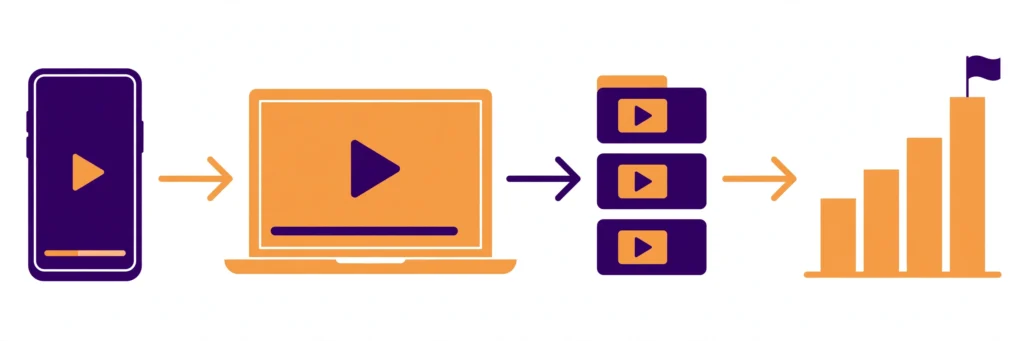
Cards point a viewer to a relevant video at the right moment inside the video, and end screens send the viewers who finished to the next video. The final 20 seconds of a video are where retention usually fails, so do not end with a blank screen or a silent logo. Speak directly into the next video and say what the viewer will get from it. A simple line works: “If this helped, the next video shows the full setup step by step.” Even a five-second preview of the next video builds the bridge. The diagram below shows the chain: a Short brings a new viewer in, a long video holds them, a playlist keeps them watching, and the watch time adds up.
Strategy 4: Go live, because archived livestreams count
Livestreams are the fastest honest way to add watch hours, because one long stream can add hundreds of hours in a single evening, and the watch time counts as long as the stream is public and saved as video on demand. A weekly question-and-answer session, a live tutorial, or a live repair or build can run 60 to 90 minutes, and regular viewers often watch far longer than they watch an edited video. The conditions matter: the stream must stay public and be converted to video on demand. An unlisted or deleted stream adds nothing, and a stream that is never saved adds nothing either.
Keep it simple. Pick one fixed day and time, tell your viewers in advance with a community post, and prepare three or four questions or topics so the stream does not stall. Answer live questions from the chat, because interaction is what keeps people watching a stream instead of a recording. After the stream, the saved video keeps earning watch time for months, and you can cut short clips from it to bring new viewers to the full recording. Do not run a 24-hour loop of the same video and call it a livestream strategy: looping old content as a fake live stream misleads viewers and risks a policy problem, and it is not a plan you can build a channel on.
Strategy 5: Use Shorts to pull viewers into long videos
Shorts are the most misunderstood part of this goal. A Short can bring thousands of new viewers to your channel, and those viewers can subscribe, but Shorts Feed watch time adds zero hours toward the 4,000. A channel that grows only through Shorts can reach 1,000 subscribers and still have almost no qualified watch hours. That is the trap: the subscriber counter moves while the watch-hour counter stays still.
Use Shorts as an entry point, not as the destination. Cut a 30 to 60-second highlight from a long video, end it with a clear reason to watch the full version, and link the full video in the comments and description. A Short that answers a small question and points to the full tutorial does two jobs at once: it finds new viewers, and it sends the interested ones to the video that actually earns watch hours. If your Shorts bring subscribers faster than your long videos bring watch hours, slow down the Shorts and publish more long videos until the two counters move together. Our first 1,000 subscribers plan explains how to balance the two formats across a 90-day schedule, so the subscriber goal and the watch-hour goal finish at roughly the same time.
Strategy 6: Fix the leaks with your retention reports
YouTube Studio already tells you where your watch time is leaking. Open the Analytics of your last five videos and look at the audience retention graph. Dips show where viewers left or skipped, spikes show where they rewatched, and flat sections show where they watched through. Write down where the biggest dip falls in each video, and the pattern will show itself quickly.
| What the graph shows | What it usually means | What to fix |
|---|---|---|
| Dip in the first 10 to 30 seconds | Slow or vague opening | Start with the answer or the question |
| Dip after a long explanation | Too much talk, same picture | Change the visual with each new point |
| Dip at a promotion or a plug | The viewer feels sold to | Move it to the end or shorten it |
| Spike at one moment | Viewers found that part useful | Make more of that kind of moment |
| Flat section with low views | A necessary but dull step | Speed it up, or show it instead of describing it |
Fix one leak at a time and measure the next video against the last one. Small gains compound: if your average view duration rises from 3 minutes to 4 minutes, the views you need for 4,000 hours fall from 80,000 to 60,000. You do not need a new camera or new software for this work. You need the retention graph and the habit of checking it after every upload.
What does not work: shortcuts to avoid
Every shortcut below is sold somewhere as a fast way to 4,000 hours. Each one either does not count, or it puts the channel at risk. YouTube’s rules are clear that only real watch time from public long-form videos counts, and channels are reviewed as a whole before they are accepted into the Partner Program.
| Shortcut | Why it fails |
|---|---|
| Buying views or watch time | Paid or fake views do not count toward the threshold, and artificial engagement can lead to a rejected application or removal from the program |
| Looping your own videos on repeat | Repeated plays from the same viewer or device do not build real watch time, and the pattern is easy for YouTube to detect |
| Watch-for-watch or sub-for-sub groups | Watch time from people who are not interested in the content drops off fast, hurts retention, and teaches YouTube the wrong audience for your channel |
| Running ads to buy watch hours | Watch time from ad campaigns is explicitly excluded from qualified watch hours |
| Uploading long silent or still videos | Viewers leave in seconds, so the average view duration collapses, and low-value content can fail the channel review |
| Re-uploading the same video many times | Duplicates split your audience, add no new watch time, and look like spam to reviewers |
| Paying for a “guaranteed monetization” course | No course can guarantee acceptance, because acceptance depends on YouTube’s review of your channel; check the warning signs in our guide to red flags in YouTube growth courses before paying for any growth promise |
A 4-week practice plan
This is a suggested practice schedule, not a guarantee. It gives a new channel a repeatable weekly routine that touches every strategy above. Adjust the numbers to your time and your topic, and keep the routine going until the counters move.
| Week | Publish | Watch-hour work | Check in Analytics |
|---|---|---|---|
| Week 1 | 2 long videos + 2 Shorts cut from them | Rewrite the first 30 seconds of each video; build one playlist from your best videos | Average view duration and the 30-second retention mark |
| Week 2 | 2 long videos + 1 livestream (60 minutes) | Add cards and end screens to all videos; save the stream as video on demand | Where the biggest retention dip falls in each video |
| Week 3 | 2 long videos + 2 Shorts pointing to them | Fix the biggest leak found in Week 2; reorder playlists so the strongest video is first | Watch time from playlists and end screens |
| Week 4 | 2 long videos + 1 livestream | Repeat what worked; drop the format that earned the least watch time | Total qualified watch hours in the Earn section of YouTube Studio |
Check your progress in YouTube Studio under Earn, where YouTube shows your qualified watch hours and your qualified Shorts views. That is the only count that matters for the application. Public view counts on your videos are not the same number.
A note on the reported 2027 threshold change
Several creator-news sites report that YouTube has announced higher thresholds for new applicants from 1 February 2027: 8,000 qualified watch hours or 20 million qualified Shorts views, double the current numbers, with creators already in the Partner Program unaffected. We have not verified this from YouTube itself. YouTube’s own Help page, checked on 24 November 2026, still lists 4,000 hours and 10 million Shorts views. Treat the reported change as a warning, not a fact: aim to finish the current 4,000-hour bar while it is the published rule, and re-check the official Help page before you plan around any new number. If the bar does rise, every strategy in this article still applies, because longer average view duration and more videos watched per session are what move the total under any threshold.
What to do after you cross 4,000 hours
When YouTube Studio shows you have met the threshold, apply from the Earn section of YouTube Studio. You will review and accept the base terms, then set up or link an AdSense for YouTube account. Your channel then goes into review, which typically takes about one month. If your first application is not accepted, you can appeal within 21 days, or keep uploading original content and re-apply after 30 days. After repeated rejections, the wait to re-apply is 90 days. Keep publishing while you wait, because a channel that goes quiet for six months can lose monetization even after joining. And remember that meeting the threshold is only the entry ticket: what you earn after joining depends on your niche, your audience’s location, and your ad formats. Our guide to YouTube RPM in India explains honestly what creators earn per 1,000 views and why the numbers vary so much between niches.
Frequently asked questions
Do Shorts count toward the 4,000 watch hours?
No. Watch time from Shorts, including views in the Shorts Feed, does not count toward the 4,000 qualified watch hours. Shorts have their own route: 10 million qualified Shorts views in the last 90 days, with 1,000 subscribers. Use Shorts to find new viewers and send them to your long videos.
Do livestreams count toward watch hours?
Yes, if the livestream is public and converted to video on demand. Watch time from livestreams that are unlisted, deleted, or never saved as video on demand does not count.
What happens to watch hours older than 12 months?
They fall out of the total. YouTube counts the last 12 months on a rolling basis, so a channel that stops uploading can see its qualified watch hours drop over time. Regular uploads protect the total.
Can I buy views or run ads to reach 4,000 hours faster?
No, and trying can hurt the channel. Watch time from ad campaigns is explicitly excluded, and bought or artificial views do not count toward the threshold. Channels are reviewed as a whole before acceptance, so fake engagement risks the application itself.
Do I need 4,000 hours and 10 million Shorts views?
No. You need one or the other, along with 1,000 subscribers. Either 4,000 qualified watch hours in the last 12 months, or 10 million qualified Shorts views in the last 90 days.
Your next step
Open YouTube Studio, go to the Earn section, and write down your current qualified watch hours and your average view duration from your last five videos. Then use the formula above to work out how many views you need. Pick one strategy from this article, apply it to your next two videos, and check the retention graph after each upload. Small, steady gains in average view duration change the size of the job more than any single viral video. If you want a structured path for the whole channel journey, from niche selection to monetization, explore the Skill Seeker program.
About Padhaku
Padhaku is an India-focused digital skills learning platform founded by Anubhav Shukla. It focuses on making practical digital education more accessible to learners, with step-by-step guides on YouTube growth, freelancing, SEO, and online earning, written in simple language for beginners.
Sources and further reading
- YouTube Help, “The YouTube Partner Programme overview and eligibility” – https://support.google.com/youtube/answer/72851 (checked 24 November 2026)
- YouTube Help, “Overview of the expanded YouTube Partner Program” – https://support.google.com/youtube/answer/13429240 (checked 24 November 2026)
- vidIQ, “YouTube Monetization Requirements: 2026 Guide” – https://vidiq.com/blog/post/how-to-monetize-youtube-channel-beginners-guide/ (inspected 24 November 2026; used for the reported 2027 threshold change and method framing only)
- Alan Spicer, “5 Tips to Increase YouTube Watch Time and Audience Retention” – https://alanspicer.com/5-tips-increase-youtube-watch-time/ (inspected 24 November 2026; method framing only)
- ScaleLab, “How to boost your watch time on your YouTube videos” – https://scalelab.com/en/how-to-boost-your-watch-time-on-your-youtube-videos (inspected 24 November 2026; method framing only)
1 Comment.