Google Ads in Plain Words
Google Ads is Google’s advertising platform. Businesses pay Google to show their ads when people search for something related, watch YouTube videos, or browse websites. You pay only when someone actually clicks your ad, not when it is just shown.
If you are learning digital marketing in India, Google Ads is one of the most practical skills you can pick up. It is also one of the few marketing skills where beginners can see real results with small budgets, because you control exactly how much you spend per day. This guide explains what Google Ads is, how the auction and pricing work in plain words, what it really costs in India, the order in which to learn it, and how to set up your first campaign step by step. You can follow this guide for free and spend your first rupee only when you are ready.
You can also learn Google Ads as part of a structured path: Padhaku is an India-focused digital skills platform where beginners work through topics like this in a sensible order instead of jumping between random tutorials.
What Is Google Ads?
Google Ads is an online advertising system run by Google. A business creates an ad, chooses which searches or audiences should see it, and sets a budget. Google then shows the ad to relevant users and charges the business when someone clicks it.
The full name of this payment model is pay-per-click, or PPC. It is the core idea of the platform, and it is worth understanding before anything else:
- Your ad can be shown (displayed) thousands of times for free if nobody clicks it.
- You pay only for clicks, and you set a daily budget cap, so the spending stays under your control.
- Because every click is measured, you can see exactly what each click cost and what it led to.
This is different from traditional advertising, where you pay for exposure whether anyone responds or not. In Google Ads, the measurement is built in from the start.
How Google Ads Actually Works: The Auction in Plain Words
Every time someone searches on Google, an instant auction happens behind the scenes. Advertisers whose keywords match the search enter this auction, and Google decides which ads to show and in which order. This happens in a fraction of a second.
The important part: the highest bidder does not automatically win the top spot. Google weighs two things together:
- Your bid. The maximum you are willing to pay for one click. You can set this manually or let Google adjust it automatically.
- Your quality. Google scores your ad and landing page on relevance and usefulness. This is often called the Quality Score. A relevant ad with a good landing page can outrank a higher bid from a sloppy advertiser.
So the formula is roughly: better bid + better relevance = better position at lower cost. This is good news for beginners and small businesses, because care and relevance can beat big budgets.
Three terms you will see everywhere:
- CPC (cost per click). What you actually pay for one click. It varies by industry and competition.
- CTR (click-through rate). The percentage of people who click your ad after seeing it. Higher usually means your ad is relevant.
- Conversion. The action you want: a purchase, a signup, a call, a form fill. A click is only a cost; a conversion is a result.
Where Your Ads Can Appear
Google Ads is not only the sponsored results at the top of a Google search. There are several campaign types, and each puts your ads in a different place:
| Campaign type | Where ads show | Best for |
|---|---|---|
| Search | Google search results, next to organic results | Beginners. People are already looking for what you offer. |
| Display | Banners on millions of websites and apps | Brand awareness and remarketing. |
| Video (YouTube) | Before or during YouTube videos | Visual products, demos, storytelling. |
| Shopping | Product listings with price and image in search | E-commerce stores with a product catalogue. |
| App | Across Google Play, YouTube, Search and more | Driving app installs. |
| Performance Max | Across all Google platforms, managed by automation | Later, once you have conversion data and budget. |
If you are starting out, Search campaigns are the right place to begin. The intent is strongest there: the person typed exactly what they want. Learn Search first, get comfortable, then explore the others one by one.
How a Google Ads Account Is Organised
The structure has four levels. Understand this hierarchy once and every tutorial will make sense:
- Account. Your Google Ads account, tied to your business and billing.
- Campaign. One campaign has one goal, one budget, and one type (for example, a Search campaign for leads).
- Ad group. A campaign contains ad groups. Each ad group holds a tight set of closely related keywords and the ads written for them.
- Ads and keywords. Inside each ad group: the actual ad copy people see, and the keywords that trigger them.
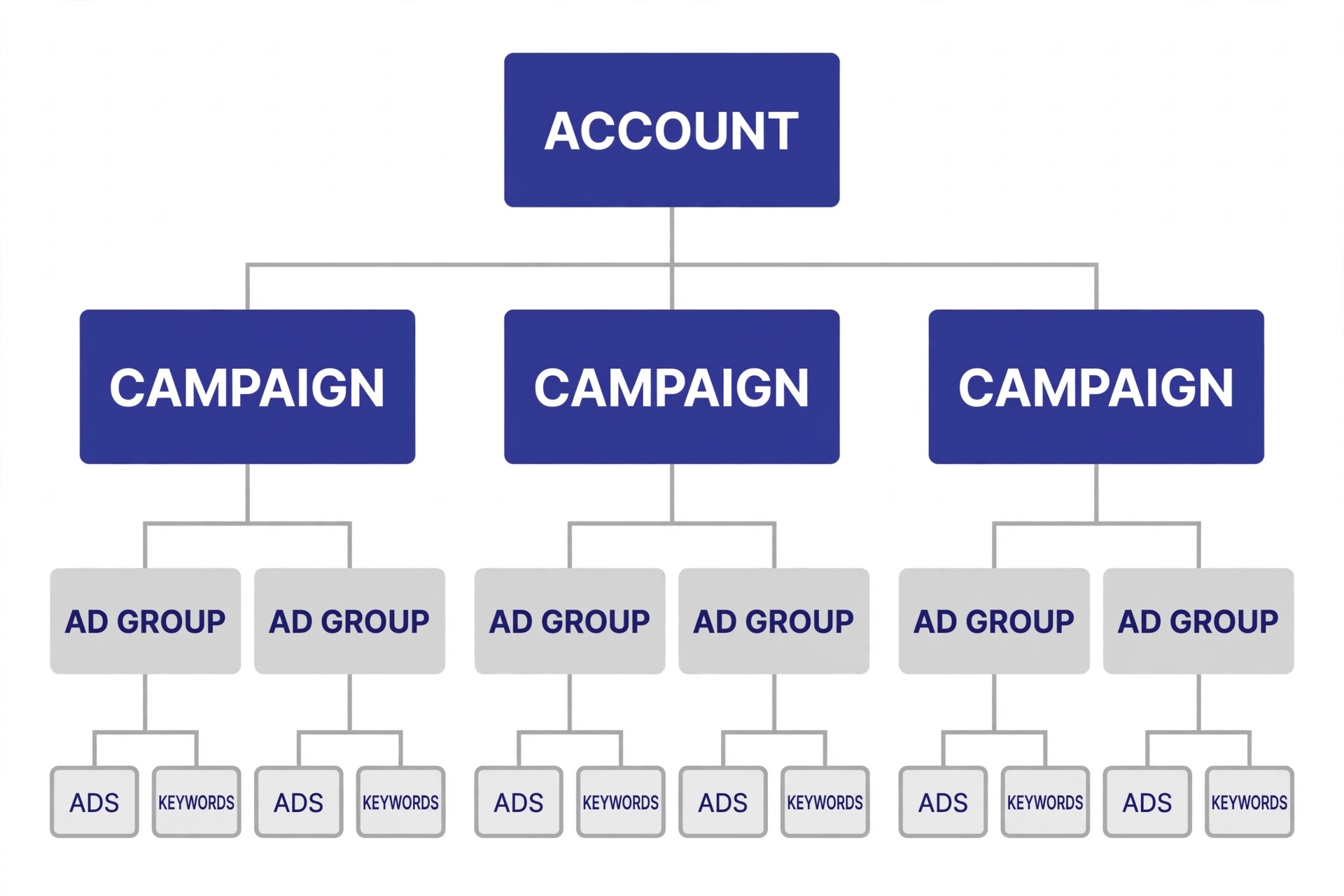
The golden rule of structure: keep keywords tightly grouped. An ad group about “running shoes for women” should not also contain “running shoes for men.” Tight groups mean relevant ads, and relevant ads mean lower costs.
How Much Does Google Ads Cost in India?
This is the first question every beginner asks, and the honest answer is: it depends on your industry, competition, and how well you set things up. But ranges help, so here are orientation ranges from Indian beginner guides, with an important caveat first.
Caveat: these are rough ranges reported by third-party Indian blogs, not official Google pricing. Your actual costs can land anywhere inside or outside these bands depending on your keywords, ad quality, and city targeting. Treat them as orientation, not promises.
| Competition level | Rough CPC range in India | Examples |
|---|---|---|
| Low | About Rs 2-10 per click | Niche or local services with little competition |
| Medium | About Rs 10-50 per click | Clinics, coaching centres, salons |
| High | About Rs 50-200+ per click | Real estate, finance, insurance |
A more granular breakdown from another Indian guide: local services Rs 20-50 per click, education Rs 15-40, e-commerce Rs 10-30, real estate Rs 50-150. Notice how much industry matters: the same platform costs very differently in different markets.
What about a starting budget? Indian trainers commonly suggest Rs 5,000-10,000 per month for a first learning campaign, and some call Rs 5,000 per month enough for testing the waters. You set a daily budget cap in the account, so spending cannot run away from you. Start small, learn from the first few weeks of data, then decide whether to scale.
Learn Before You Spend: A Free-First Resource Map
The biggest beginner trap is paying for a course and ad spend before understanding the basics. Google Ads can be learned almost entirely for free, in this order: theory first, then practice with free tools, then a small real budget. Here is an honest map of the main resources.
| Resource | Cost | Best for | Honest note |
|---|---|---|---|
| Google Skillshop (Google Ads certifications) | Free | Structured official learning with certificates | The single best starting point; go through the Search Ads modules before anything paid. |
| Google’s official Help Center | Free | Answering specific questions while you work | Excellent reference, not a learning path on its own. |
| Keyword Planner (inside a Google Ads account) | Free | Researching keywords and seeing rough cost estimates | Free to use for research even before you run ads. |
| YouTube tutorials (Hindi and English) | Free | Seeing the interface in action | Quality varies wildly; prefer recent videos and cross-check anything that sounds like a trick. |
| Practice with a small real budget | Rs 5,000-10,000 to start | Your real education | Nothing teaches like spending a little of your own money and watching the data. |
| Paid courses | Varies | Structure and mentorship | Optional, not required. Buy one only after the free resources, and only from a trainer with verifiable experience. |
The free-first order matters because it removes the two things that make beginners quit: confusion and wasted money. Skillshop gives you vocabulary, Keyword Planner gives you practice with real data, and a tiny budget gives you experience. In that order.
Your 90-Day Google Ads Learning Roadmap (Week by Week)
Here is a week-by-week plan built around about 1-2 focused hours a day. It assumes zero starting knowledge and a free-first approach: no ad spend until week 9. This roadmap sits inside the wider digital marketing career roadmap – Google Ads is one of the core skills in that plan.
| Weeks | Focus | What you do | Milestone |
|---|---|---|---|
| 1-2 | Foundations | Learn what PPC, CPC, CTR, Quality Score, and the auction mean. Read Google’s official overview and the Skillshop intro modules. | You can explain the auction to a friend in plain words. |
| 3-4 | Skillshop certifications | Complete the Google Ads Search certification path on Google Skillshop. Take notes, not just the certificate. | Search Ads certification earned (free). |
| 5-6 | Keyword research | Open Keyword Planner with your Google account. Research keywords for 2-3 sample businesses. Practice match types and negative keywords. | A keyword research sheet for a sample business, with match types assigned. |
| 7-8 | Campaign structure and ad copy | Study account structure. Write 10 sample responsive search ads for the sample business. Learn ad assets (formerly extensions). | 10 written ads you would be proud to show a client. |
| 9-10 | First real campaign | Set up a small Search campaign with a Rs 200-300/day budget cap for a real or practice business. Install conversion tracking. | A live campaign collecting real data. |
| 11-12 | Reading data and optimising | Review search terms, add negative keywords, test new ad copy, adjust bids and budgets based on what the data says. | A one-page report: what worked, what did not, what you changed. |
After these 90 days you are not an expert, but you are genuinely dangerous in the good sense: you have a certification, a keyword research sheet, sample ads, one real campaign, and one data-driven report. That is a portfolio. Most “Google Ads experts” with certificates alone cannot show any of that.
Setting Up Your First Google Ads Campaign (Step by Step)
When you are ready to create your first campaign, here is the setup flow. These steps follow the official account creation process and standard beginner practice.
- Create your account. Go to ads.google.com and sign in with your Google account. You will enter your business details, country, time zone, and currency. Choose India, Asia/Kolkata, and INR, because these cannot be changed later. You will also add billing details before ads can run.
- Switch to Expert Mode. Google’s guided setup is simplified and hides important controls. Expert Mode shows you everything. It looks more complex, but it is the mode every serious advertiser uses.
- Choose your goal. For a first campaign, “Leads” or “Sales” fits most practice scenarios. The goal tells Google’s automation what to optimise for.
- Select Search campaign type. Start with Search only. Turn off the Display network for your first campaign so your budget stays on high-intent searches.
- Set location targeting. Target only where your practice business can actually serve customers. For Indian beginners, that often means one city or state, not the whole country. Irrelevant locations are one of the biggest budget leaks.
- Set a daily budget. Start with Rs 200-300 per day as a learning budget. This is your daily cap: Google will not exceed it.
- Choose bidding. Start with a simple strategy you understand. Many beginners begin with manual or simple automated bidding on clicks, then move to conversion-based bidding once tracking is in place.
- Build ad groups with tight keywords. Group closely related keywords together. One ad group per theme, not one ad group per campaign.
- Write your ads. Match the ad headline to the keywords in the ad group. Include what you offer, who it is for, and a clear call to action.
- Set up conversion tracking before you launch. This is the step most beginners skip and most regret skipping. Without tracking, you see clicks but never learn which clicks became customers.
Launch, then wait for data. A common beginner mistake is changing everything on day two. Let the campaign collect at least a few days of data before you judge it.
Keywords and Match Types: The One Concept That Saves Your Budget
Keywords decide when your ad appears. But the exact keyword you type is not the whole story. Google offers match types that control how closely a search must match your keyword:
- Broad match. Your ad can show for searches related to your keyword, even loose variations. Widest reach, but also the easiest way to burn budget on irrelevant clicks. Beginners should use this sparingly.
- Phrase match. Your ad shows when the search contains your keyword’s meaning in the right order. A middle ground: decent reach, better control.
- Exact match. Your ad shows only for searches with the same meaning as your keyword. Tightest control, smallest reach.
For your first campaigns, lean on phrase and exact match. They give you control while you are still learning.
Then learn negative keywords: words that block your ad from showing. If you sell premium watches, add “free,” “cheap,” and “repair” as negatives so you do not pay for clicks from people who will never buy. Reviewing the actual search terms your ads appeared for, and adding negatives, is the single highest-value weekly habit in Google Ads.
Common Beginner Mistakes (and the Fix for Each)
| Mistake | Why it hurts | Fix |
|---|---|---|
| Using only broad match keywords | Ads show for irrelevant searches; budget drains fast | Start with phrase and exact match; add broad only deliberately |
| No negative keywords | You pay for clicks that can never convert | Review search terms weekly and add negatives |
| Targeting all of India (or the world) | Most clicks come from places you cannot serve | Target only your real service area |
| No daily budget cap | Spending surprises | Always set a daily cap; start at Rs 200-300/day |
| Skipping conversion tracking | You see costs but never learn what worked | Install tracking before launch, not after |
| Weak, generic ad copy | Low clicks, low Quality Score, higher costs | Match headlines to the ad group’s keywords; be specific |
| Changing everything daily | You never learn what caused what | Change one thing at a time; give changes a few days |
| Expecting instant results | Quitting before the data means anything | Judge a first campaign after weeks, not days |
Your First Practice Assignment
Reading is not learning in Google Ads. Here is an assignment that takes about a week and costs nothing. Do it before your first real campaign.
Assignment: The Rs 0 Practice Campaign Plan
Pick a real local business you know: a coaching centre, a dental clinic, a bakery, a salon. Then produce these four deliverables on paper (or a document):
- A keyword research sheet. Use Keyword Planner to find 30 keywords for the business. Assign each a match type (phrase or exact) and a rough CPC note. Mark 10 negative keywords you would add on day one.
- Two ad groups. Split your keywords into two tight themes. Explain in one line each why these keywords belong together.
- Three sample ads. Write three responsive search ads for one ad group: headlines that match the keywords, descriptions with a clear call to action, and two ad assets you would add.
- A budget plan. With a Rs 6,000 monthly budget, show your daily cap, how you would split it between the two ad groups, and what you would check after week one.
When you can produce these four documents for any local business in an afternoon, you are ready to run a real campaign. This assignment is also the first piece of a portfolio you can show to future employers or clients.
Frequently Asked Questions
Is Google Ads free to learn? Yes. The best learning resources, Google Skillshop certifications, Keyword Planner, and the official documentation, are all free. You only pay when you choose to run ads, and even then you control the daily budget.
How much money do I need to start running Google Ads in India? You can open an account and do keyword research for free. Indian trainers commonly suggest Rs 5,000-10,000 as a first learning budget, with Rs 5,000 per month described as enough for testing. Start at the low end while you are learning.
Do I need a website to run Google Ads? For most campaign types, yes: your ad needs somewhere to send people, and the landing page quality affects your costs. A simple one-page website is enough to start.
Can beginners really manage Google Ads, or is it only for agencies? Beginners can absolutely start with Search campaigns. The platform looks complex, but the fundamentals in this guide cover most of what a first campaign needs. Agencies add value at scale, not at the starting line.
How long does it take to learn Google Ads? The roadmap in this guide takes about 90 days at 1-2 hours a day to reach a genuinely useful beginner-to-intermediate level. Mastery takes longer and comes only from managing real budgets over time.
Should I learn Google Ads or Meta Ads first? If your goal is to capture existing demand (people searching for a solution), learn Google Ads first. If your goal is to create demand with visuals and social content, Meta Ads may fit better. Many performance marketers eventually learn both.
About Padhaku
Padhaku is an India-focused digital skills learning platform founded by Anubhav Shukla. It focuses on making practical digital education more accessible to learners.
If this guide helped you, the next step is a guided path instead of scattered tutorials. The Skill Seeker program at Padhaku walks through core digital marketing skills, including Google Ads, in a practical order with real assignments: the Skill Seeker program
Conclusion
Google Ads rewards two things: understanding how the auction really works, and the discipline to start small and learn from data. You now have both the theory and a 90-day plan. Learn free first, practise with Keyword Planner, complete the Skillshop certification, and only then put a small real budget behind your first campaign. That order is what separates beginners who learn the skill from beginners who just spend money.
2 Comments.