
Meta Ads Complete Guide for Indian Beginners (2026)
If you want to learn paid advertising in India, Meta ads are the most practical place to start. Meta ads are paid advertisements that appear on Facebook, Instagram, Messenger and partner apps. You create and manage them through a free tool called Meta Ads Manager, where you choose who sees your ads, how much you spend, and what you want people to do after seeing them. This guide explains the whole system in plain language: how the auction works, the three levels every campaign has, the six objectives you can choose from, what to set up before spending a single rupee, and how to launch your first campaign step by step. No hype, no income promises, just the system as it works in 2026.
At Padhaku, Meta ads are treated as a core skill inside digital marketing: one tool in a larger toolbox that also includes SEO, content and Google ads. This guide is written for that mindset, so you learn the mechanics properly instead of memorizing button clicks.
What Are Meta Ads, Exactly?
“Meta ads” is the current name for what most people still call Facebook ads. Meta is the company behind Facebook, Instagram, Messenger and WhatsApp. When you run a Meta ad campaign, your ad can appear across Facebook feeds, Instagram feeds, Instagram Stories and Reels, Messenger, and a network of partner apps and sites called the Audience Network. One campaign can cover all of these placements, or you can pick specific ones.
Two things make Meta ads different from simply posting on social media:
- Reach beyond your followers. An organic post mostly reaches people who already follow you. A paid ad reaches people who have never heard of you, chosen by age, location, interests, behaviour or past interaction with your business.
- Payment for attention. You pay Meta to show your ad. You are not paying for guaranteed sales or leads, only for the chance to be seen by the right people. Whether that attention turns into results depends on your offer, your creative and your landing page.
How Meta Ads Actually Work: The Auction
Every time there is space to show an ad to a user, Meta runs an automated auction among advertisers who want to reach that person. The winner is not simply the highest bidder. Meta weighs three things:
- Your bid. What you are willing to pay for the result you want.
- Estimated action rates. How likely Meta thinks this person is to take the action your campaign is optimized for, based on past behaviour.
- Ad quality. Relevance, engagement history and whether the ad follows Meta’s policies.
This means a well-made, relevant ad can win auctions against a bigger budget. It also means throwing money at a bad ad rarely fixes it. Beginners who understand this one idea make better decisions than beginners who only learn which buttons to click.
The 3-Level Structure: Campaign, Ad Set, Ad
Every Meta campaign is built in three layers. This structure confuses most beginners, so take a minute with it. It is the single most important concept in this guide.
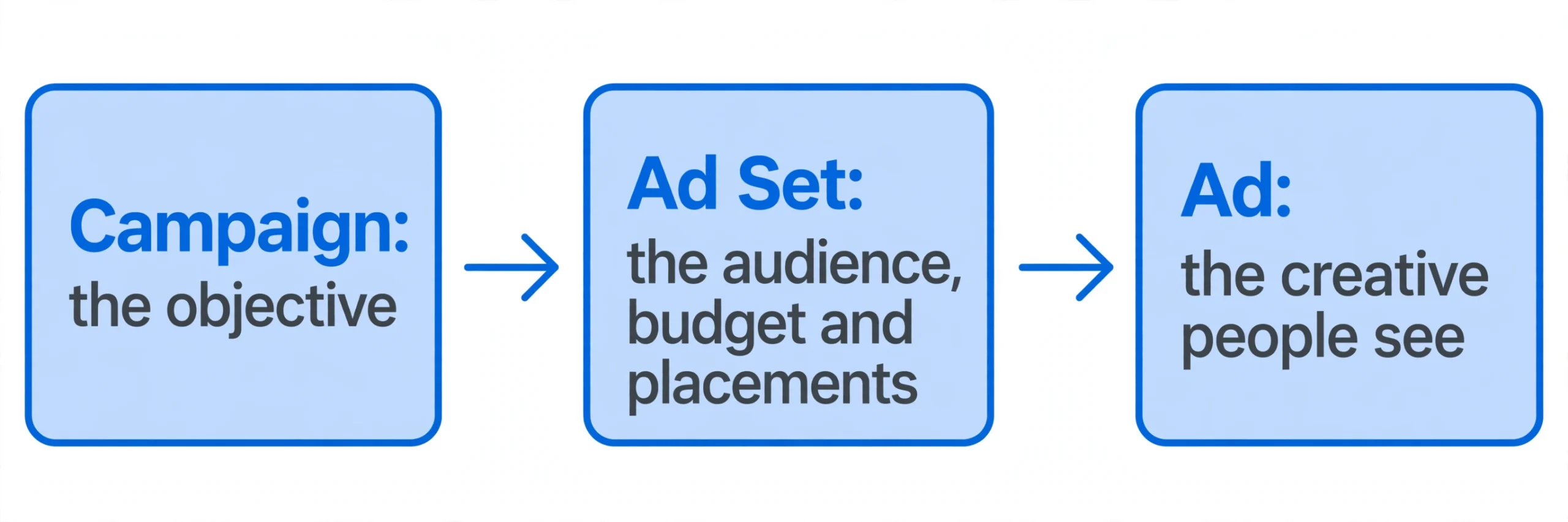
- Campaign (the objective). At this level you answer one question: what do you want to happen? You pick an objective such as Traffic, Leads or Sales. One campaign has one objective.
- Ad Set (the audience, budget and placements). At this level you decide who sees the ads, how much you spend, when the ads run and where they appear. One campaign can contain several ad sets testing different audiences. This is where your money is actually controlled.
- Ad (the creative). This is what people see: the image or video, the headline, the text and the call-to-action button. One ad set can contain several ads so Meta can test which creative works best.
A simple example: a bakery in Pune runs one Campaign with the Leads objective. Inside it, one Ad Set targets women aged 25-45 within 10 km of the bakery, with a daily budget and Instagram Reels plus Facebook Feed placements. Inside that ad set, three Ads run: one video of cakes being decorated, one photo carousel of the menu, one customer review graphic. Meta shows all three and gradually spends more on the one people respond to.
The 6 Campaign Objectives (and When to Use Each)
Meta currently offers six objectives. Your choice here changes which auctions you enter and what Meta optimizes for, so it matters more than most settings.
| Objective | What Meta optimizes for | Use it when |
|---|---|---|
| Awareness | Showing your ad to as many people as possible | You are launching a brand and want visibility first |
| Traffic | Clicks to your website or app | You want visitors to a page, blog or listing |
| Engagement | Likes, comments, shares, video views | You want social proof and interaction on a post or video |
| Leads | People submitting their contact details | You collect enquiries through forms, calls or messages |
| App Promotion | App installs or in-app actions | You have a mobile app to grow |
| Sales | Purchases or other tracked conversions | You sell online and can track orders on your site |
For beginners, the safest starting points are Traffic (easy to measure: did people click?) or Leads (easy to value: each enquiry has a worth to the business). The Sales objective is powerful but needs proper conversion tracking on your website to work, which is an advanced setup. A common beginner mistake is choosing Sales with no tracking in place and wondering why nothing happens.
Boosted Post vs Meta Ads Manager: Know the Difference
Every Facebook Page has a blue “Boost Post” button. Boosting is a simplified way to pay for more reach or engagement on something you already posted. It is quick, but it gives you very little control over objectives, audiences and optimization.
Meta Ads Manager is the full tool: campaigns, ad sets, detailed audiences, budgets, placements, testing and proper reporting. Every serious advertiser uses it. Meta Business Suite sits in the middle: it is the hub for managing your Page, scheduling organic posts and handling messages, with basic ad boosting built in.
Rule of thumb: boosting is fine for getting a post seen by more of your existing audience. For anything with a business goal behind it, leads, sales, signups, use Ads Manager. Learning Ads Manager from day one is the better investment of your time, and it is what this guide teaches.
Before Your First Ad: The Setup Checklist
Do not open Ads Manager and start spending until these six things are in place. Most wasted beginner budgets trace back to skipping this list.
- 1. A Facebook Page for the business. Ads run from a Page, not a personal profile. If the business has no Page, create one first.
- 2. An Instagram account connected to the Page. Connect it so ads can run on Instagram placements under the right handle.
- 3. A Meta Business Manager account. Create it free at business.facebook.com and add your Page, Instagram account and ad account inside it. Running ads from a personal profile risks restrictions and gives you fewer features.
- 4. An ad account with INR as the currency. Set the billing currency to Indian Rupees and add a payment method (card, netbanking or UPI where supported). Get this right at creation; currency is hard to change later.
- 5. The Meta Pixel installed on the website. The Pixel is a small piece of code that tracks what visitors do on your site. It powers conversion tracking, retargeting and lookalike audiences. Install it through your platform’s plugin (Shopify, WooCommerce) or paste the code manually, then confirm it fires with the Meta Pixel Helper browser extension before spending.
- 6. A page worth sending traffic to. Your ad earns the click; your landing page earns the result. Before spending, make sure the destination page has a clear headline, the price in INR, a visible call-to-action and, for products, real photos and a few genuine reviews.
Your First Campaign, Step by Step
Here is the exact sequence for a beginner’s first campaign. We will use a Leads objective as the example because it is the most common first goal for Indian small businesses, but the steps are the same for any objective.
Step 1: Open Ads Manager and click Create
Go to Meta Ads Manager, click the green Create button, and choose your objective. For this example, choose Leads. Name your campaign something you will understand in a month, like “Leads – Website Form – Oct 2026”. Good naming is a habit that pays off when you run many campaigns.
Step 2: Set up the ad set (audience, budget, placements)
Name the ad set after its audience, for example “Women 25-40, Mumbai”. Then set:
- Conversion location: where leads go (website form, instant form, WhatsApp or calls). Instant forms keep users inside Facebook/Instagram; a website form gives you more control.
- Budget: a daily budget you are comfortable losing while you learn. Many Indian beginner guides suggest starting around Rs 300 to Rs 500 per day and treating the first week as a learning budget, not an investment expected to return immediately.
- Audience: start simple. Location (your city or India), age range, and one or two broad interests related to the business. Do not stack ten interests on day one; narrow targeting with no data often backfires.
- Placements: beginners can start with Advantage+ placements (Meta chooses where to show the ad) and refine later once data shows what works.
Step 3: Create the ad (creative, copy, CTA)
Upload one clear image or a short vertical video. Write primary text that states the offer in the first line, since most people never expand the text. Add a headline and choose the call-to-action button that matches the goal (for example, “Sign Up” for a form, “Send Message” for WhatsApp enquiries). Check the ad preview for mobile, because most Indian users will see it on a phone.
Step 4: Publish, then wait
Click Publish. Meta reviews the ad (usually within a few hours) and then the learning phase begins: Meta tests your ad on different people to find who responds. Do not edit anything during the first 2 to 3 days. Editing resets the learning, and beginners who tweak daily never give the system a fair chance.
Step 5: Read the first numbers
After 3 to 4 days, look at simple metrics: how many people saw the ad (reach), how many clicked (CTR, or click-through rate), and what each result cost (cost per lead). Do not judge a campaign on day one. Judge it after it has spent enough to produce a meaningful number of results.
Step 6: Keep, fix or kill
If leads are coming at a cost the business can afford, keep it running and increase the budget gradually (small steps, not sudden jumps). If nothing works after a fair test, change one thing at a time: the creative first, then the audience, then the offer. Changing everything at once teaches you nothing.
Decision Framework: Meta Ads vs Google Ads vs Both
One of the most common beginner questions is whether to start with Meta ads or Google ads. They solve different problems, and picking wrong wastes months. Here is a practical framework by business type and budget.
| Your situation | Start with | Why |
|---|---|---|
| Local service (salon, clinic, coaching, repairs) with a small budget | Meta ads | You can target people by location cheaply and collect enquiries through WhatsApp or instant forms |
| Online store selling products people already search for | Google ads | Search captures existing demand; people typing “buy” queries convert faster |
| New product nobody searches for yet | Meta ads | You need to create demand with visuals and video, which social feeds do well |
| Freelancer or agency selling services | Meta ads for leads | Targeting by interests and job titles finds clients; lead forms keep costs controlled |
| Content creator growing an audience | Meta ads (Engagement objective) | Cheap reach and followers; pair with organic content, not as a replacement |
| Established business with steady budget | Both | Google captures demand, Meta creates it and retargets website visitors from both channels |
The short version: Google ads capture existing demand, Meta ads create new demand. If people already search for what you sell, start with search. If you need to show people something they did not know they wanted, start with Meta. Our beginner’s guide to Google Ads covers the search side of this decision in detail, and reading both guides gives you the full paid-traffic picture.
How Much Do Meta Ads Cost in India?
There is no fixed price list. You set the budget; the auction decides what each result costs based on your audience, creative quality and competition. That said, beginners need a practical starting point.
- Think in daily budgets, not total budgets. A daily budget of Rs 300 to Rs 500 is the range most Indian beginner guides suggest for a first test campaign. It is small enough to be a learning expense and large enough to produce readable data within a week.
- Budget for learning, not just for results. Treat your first Rs 2,000 to Rs 3,500 as tuition: you are buying data about your audience and creative, not guaranteed leads. Anyone who promises specific returns at a specific budget is selling you something, not teaching you.
- Give each ad set enough to learn. Meta’s system needs roughly 50 conversion events per week per ad set to optimize properly. If your budget is so small that an ad set gets two or three leads a week, the system cannot learn, and results stay random. Fewer ad sets with adequate budgets beat many starved ad sets.
- Scale gradually. When a campaign works, increase the budget in small steps rather than doubling overnight. Sudden jumps push the campaign back into learning and often spoil what was working.
Targeting Basics: The Four Audience Types
You do not need complicated targeting to start. There are four audience types; beginners need the first two.
- Core audiences. Built from demographics (age, gender, location) plus interests and behaviours. Best when you have no customer data yet. Example: women aged 25-44 in Delhi interested in fitness.
- Custom audiences. Built from people who already interacted with you: website visitors (via the Pixel), Instagram engagers, video viewers or an uploaded customer list. These are your warmest audiences and usually convert at the lowest cost, so retargeting them is worth prioritizing in almost any budget.
- Lookalike audiences. Meta finds new people similar to a source audience, like your past customers. Powerful once you have a solid source list; weak if the source is tiny or low quality.
- Advantage+ audiences. Meta’s automated targeting, where the algorithm finds the audience for you. Increasingly effective in 2026, especially when paired with good creative and clean conversion data.
A practical beginner sequence: start with one simple core audience, add a custom audience retargeting website visitors once the Pixel has data, and only then experiment with lookalikes. One honest note: as automation grows, strategy moves away from clever targeting tricks and toward choosing the right conversion event, feeding the algorithm clean data, and testing genuinely different creatives.
Creative Tips for the Indian Audience
Creative, the image or video people see, decides more of your result than any setting. A few India-specific notes:
- Vertical video first. Reels and Stories placements dominate attention. Shoot or crop vertical (9:16) rather than reusing horizontal banners.
- Lead with the problem, not the logo. The first two seconds should show the customer’s problem or the outcome, not your brand intro. Problem-solution formats consistently outperform brand-first creatives.
- Use language your audience speaks. If your customers think in Hinglish, write the ad in Hinglish. Polished English that your buyer would never say creates distance.
- Show price and next step clearly. Indian buyers comparison-shop. Hiding the price to “get enquiries” usually gets you enquiries from people who cannot afford it.
- Test concepts, not colours. Run two or three genuinely different ad ideas (a testimonial-style video vs a product demo vs an offer graphic), not five versions of the same image with different button colours. Let the data pick the winner.
- Refresh before fatigue. When frequency climbs and CTR falls, the same people have seen your ad too often. Rotate in a new creative instead of increasing the budget on a tired one.
7 Mistakes Indian Beginners Make (and How to Avoid Them)
- Boosting posts instead of building campaigns. The boost button is easy and limited. Real goals need Ads Manager.
- Skipping the Pixel. Without tracking, you cannot measure, retarget or optimize. Install it before spending.
- Choosing the Sales objective with no tracking. If Meta cannot see purchases on your site, it cannot optimize for them. Start with Traffic or Leads until tracking is solid.
- Targeting too narrow, too soon. Ten stacked interests on a Rs 300 daily budget gives the algorithm no room to work. Start broader, then narrow with data.
- Editing during the learning phase. Every edit in the first few days restarts learning. Set it, wait 3 to 4 days, then judge.
- Judging on vanity metrics. Cheap clicks mean nothing if nobody enquires. Track the metric that matches your objective: cost per lead, cost per purchase, not just likes.
- Quitting after the first failed test. Almost nobody’s first campaign works. The skill is in reading what failed and testing the next version, not in getting lucky on day one.
Reading Your Results: 4 Metrics That Matter
You do not need twenty columns of data. For a beginner campaign, four metrics tell the story:
- CTR (click-through rate). The percentage of people who clicked after seeing your ad. Low CTR usually means the creative or the audience fit is off.
- CPC (cost per click). What each click costs you. Useful for comparing creatives and audiences, but a means to an end, not the goal.
- Cost per result. What each lead or purchase costs. This is the number your business actually cares about: is a lead worth less than what it costs to get one?
- ROAS (return on ad spend). Revenue divided by ad spend, for Sales campaigns with proper tracking. A ROAS of 3 means three rupees of revenue per rupee spent. Only meaningful with complete, honest tracking.
One caution: numbers are only as honest as your tracking. If the Pixel is misfiring or leads are counted twice, every decision built on those numbers is wrong. Fix tracking before scaling spend.
FAQs
How much money do I need to start Meta ads in India?
There is no official minimum that matters in practice; what matters is having enough budget to learn. Many Indian guides suggest Rs 300 to Rs 500 per day for a first test campaign, treating the first week as a learning budget. Start with an amount you are comfortable spending purely for data.
Are Meta ads better than Google ads?
Neither is universally better. Meta ads are stronger for interest-based targeting and creating demand with visuals; Google ads are stronger for capturing people who are already searching with intent to buy. The decision framework earlier in this guide shows which fits your situation, and many businesses eventually use both.
How long does it take for Meta ads to show results?
You may see clicks within a day, but meaningful results usually need 1 to 2 weeks of testing and optimization. The learning phase alone takes a few days, and judging a campaign before that is premature.
Do I need a website to run Meta ads?
Not strictly. Lead ads with instant forms and WhatsApp or call campaigns work without a website. But you do need somewhere for interested people to go: a form, a WhatsApp number, or a page. “No website” is fine; “nowhere to convert” is not.
Can I run Meta ads for a business without an Instagram account?
Yes, you can run on Facebook placements alone. But since most Indian ad attention is on Instagram, especially Reels, connecting an Instagram account is strongly recommended for almost every business.
What to Learn Next
Meta ads are one channel in a digital marketer’s toolkit. If this guide made sense to you, the natural next steps are understanding how search advertising compares, how organic traffic works as a free complement to paid ads, and where paid skills fit into a full digital marketing career. Our digital marketing career roadmap maps the whole learning path from zero to job-ready, and our SEO guide explains the organic side that pairs well with paid skills.
If you want structured, step-by-step learning instead of piecing guides together, explore the Skill Seeker program: it teaches practical digital skills, including paid advertising, with implementation guidance rather than just theory.
About Padhaku
Padhaku is an India-focused digital skills learning platform founded by Anubhav Shukla. It focuses on making practical digital education more accessible to learners, with an emphasis on skills that lead to real work: freelancing, digital marketing, content creation and online income methods taught honestly, without hype.