Google Ads is Google’s paid advertising platform. In simple words, it is the system that puts paid ads at the top of Google search results, before and during YouTube videos, and on websites and apps that show Google ads. Businesses pay Google to reach people, and Google shows their ads to people who are searching for something related or browsing related content.
The direct answer: if you have ever searched on Google and seen results marked “Sponsored” above the normal results, you have seen Google Ads in action. The advertiser did not pay for the ad simply to appear. On a Search campaign using cost-per-click bidding, the advertiser pays only when someone actually clicks the ad. That one idea, pay for clicks rather than pay for display, is the heart of Google Ads, and everything else in this guide builds on it.
This guide is a first look, not a setup manual. It explains what Google Ads is, how it works in plain words, where ads appear, what you actually pay, how it differs from SEO and Meta Ads, and how to start learning it without spending money first. If you later want the full setup steps, the complete Google Ads guide for Indian beginners covers campaign setup, keyword match types, and a 90-day learning roadmap in depth. This article is the step before that guide: understanding the platform well enough to decide whether it is worth your time.
This guide is written by Padhaku, an India-focused digital skills learning platform. It is for absolute beginners: students, job seekers, freelancers, and small business owners in India who have heard the term Google Ads but have never opened the platform.
What you actually see as a user
The easiest way to understand Google Ads is to watch it as a user first. Search Google for a service in your city, for example a coaching centre or a plumber. The first few results often carry a small “Sponsored” label. Those are paid ads. Below them come the organic results, which nobody paid Google to place there. Organic results earn their place through relevance and SEO. Sponsored results bought their place through Google Ads.
The same logic applies elsewhere. On YouTube, an ad before a video is usually a Google Ads video ad. On a news website, a banner or a box of recommended links may come from Google’s display network. The advertiser, the place, and the format change, but the deal stays the same: the advertiser pays Google, Google puts the message in front of a relevant audience, and the advertiser measures what happened next.
That measurement is what makes Google Ads different from a newspaper ad or a hoarding. With a hoarding, you pay for exposure and you guess at the result. With Google Ads, you can see how many people saw the ad, how many clicked, and, if tracking is set up, how many of those clicks turned into an enquiry, a signup, or a sale. A click is only a cost. A conversion, meaning the action you actually wanted, is the result. Keeping those two apart is the first discipline of paid advertising.
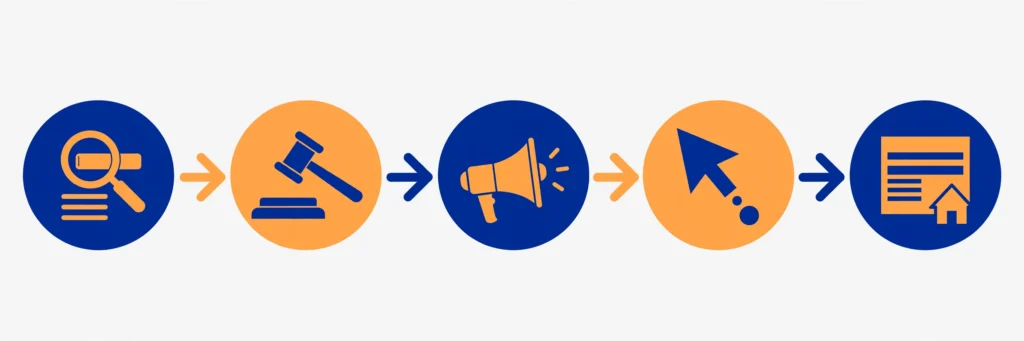
How Google Ads works in 5 steps
Here is the whole journey in five steps. Every campaign type is a variation on this pattern.
- Someone searches or browses. A person types a query into Google, watches a YouTube video, or visits a website that shows ads.
- An auction runs. In a fraction of a second, Google runs an auction among advertisers whose keywords or audiences match that moment. This is not a slow bidding war. It is automatic, and it happens for every single search.
- Google picks the winners. The auction does not simply go to the highest bidder. Google weighs the bid together with the quality and relevance of the ad and its landing page, plus minimum quality thresholds and the context of the search, such as location, device, and time. A relevant ad with a good landing page can outrank a higher bid from a careless advertiser.
- The ad shows. The winning ads appear in the available slots, marked as sponsored, above or below the organic results or in the video or display placement.
- Someone clicks, or does not. If nobody clicks, a cost-per-click ad costs the advertiser nothing for that display. If someone clicks, the advertiser is charged, and the person lands on the page the advertiser chose. What happens on that page decides whether the click was worth paying for.
That auction idea answers the most common beginner confusion: why two advertisers can pay different amounts for the same keyword. The price is set by the auction each time, not by a fixed price list. Your actual cost per click is often below your maximum bid, because you generally pay only what is needed to hold your position against the next competitor. Competition, relevance, and quality all move the price, which is why nobody can honestly promise you a fixed cost per click for your business without knowing your market.
What you actually pay, and what a budget really means
Beginners usually ask two money questions: what do I pay for, and how do I stop spending too much? The answers depend on the campaign type, and that distinction matters.
On a Search campaign with cost-per-click bidding, you pay per click, as explained above. But not every Google Ads campaign charges only for clicks. Video campaigns may charge for views, and display campaigns may charge per thousand impressions, meaning per thousand times the ad is shown. So never assume that every Google ad costs money only on a click. Always check the billing model of the campaign type you are using before you launch.
For a sense of how much a Google Ads click costs in India, see our honest CPC benchmarks by industry before you plan a budget.
Budgets work in a way that surprises many beginners. When you set an average daily budget, you are setting an average, not a hard daily cap. Google’s own Help pages explain the limits clearly: for most campaigns, your daily spending limit is two times your average daily budget, and your monthly spending limit is 30.4 times your average daily budget (30.4 being the average number of days in a month). Spend can go above the average on a busy day and below it on a quiet day, but your billed cost stays within those daily and monthly limits.
Here is a labelled hypothetical example only, to show the arithmetic. It is not a recommendation, not a typical budget, and not a forecast of results. Actual costs will differ. Suppose a beginner sets an average daily budget of Rs 300. The daily spending limit for most campaigns would then be Rs 600 (2 times 300), and the monthly spending limit would be Rs 9,120 (30.4 times 300). On a high-traffic day the campaign might spend up to Rs 600, and on a quiet day it might spend much less, but the month’s billed total stays within Rs 9,120 for that campaign. The lesson is simple: read “average daily budget” as an average, and check the daily and monthly limits before you judge whether a budget is safe.
One more honest limit: an ad budget does not fix a weak offer. If the landing page is confusing, the price is wrong, or nobody wants the product, Google Ads will buy you clicks and still produce no sales. Ads amplify what already exists. They do not create demand for something nobody wants, and they never guarantee sales or a return on your spend.
Where your ads can appear: the campaign types in brief
Google Ads is not one kind of ad. It is a set of campaign types, and each one puts ads in a different place. Beginners should know the map before choosing anything. The full setup detail is in the complete guide linked above. This table is only the map.
| Campaign type | Where ads appear | Best for a beginner to understand first |
|---|---|---|
| Search | Google search results, next to organic results | Capturing people who are already searching for what you offer. Start here. |
| Display | Banner and image ads on websites and apps in Google’s display network | Brand awareness and reaching people while they browse. |
| Video | YouTube, before, during, or beside videos | Visual products, demos, and stories that need showing, not just telling. |
| Shopping | Product listings with image and price in search results | Online stores with a product catalogue and a product feed. |
| App | Across Google Search, YouTube, Google Play, and display placements | Driving app installs and in-app actions. |
| Performance Max | Across Google’s channels from a single campaign, managed by automation | Later, once you have conversion data and a budget you understand. |
If you are starting out, Search is the right place to begin. The intent is strongest there: the person typed exactly what they want. Learn Search first, get comfortable reading its data, and only then explore the other types one by one. Performance Max in particular is a poor first campaign, because its automation hides the very decisions a beginner needs to learn.
Google Ads vs SEO vs Meta Ads
Beginners often mix up three different ways of getting attention online. This comparison keeps them apart.
| Google Ads | SEO | Meta Ads | |
|---|---|---|---|
| What you pay for | Mostly clicks (Search), or views and impressions on other campaign types | Nothing per click; you invest time and effort in content and site quality | Mostly impressions and clicks on Facebook and Instagram |
| When results appear | As soon as the campaign runs and wins auctions | Slowly, over weeks and months, as pages earn rankings | As soon as the campaign runs |
| When you stop paying | Ads stop showing | Rankings may continue for a while, then fade without maintenance | Ads stop showing |
| Who you reach | People actively searching, or browsing related content | People searching, through organic results | People scrolling social feeds, matched by interests and behaviour |
| Biggest beginner risk | Paying for clicks that never convert | Expecting fast rankings that never come | Paying for attention from people with no buying intent |
SEO and Google Ads are not rivals. They answer the same search in different ways: one paid, one earned. Many businesses use both, with ads for immediate visibility and SEO for long-term presence. To understand the earned side, read Padhaku’s SEO guide for Indian beginners. To compare the other paid platform, read Padhaku’s Meta Ads guide for Indian beginners, which covers advertising on Facebook and Instagram. The skill of choosing the right channel for the right moment is worth more than knowing any single platform deeply at the start.
Plain-words glossary: 12 terms you will meet on day one
Google Ads has its own vocabulary, and tutorials assume you know it. Here are the twelve terms that unlock almost every beginner tutorial. Learn these and the rest starts making sense.
- PPC (pay-per-click). The model where you pay when someone clicks your ad, rather than when it is merely shown.
- CPC (cost per click). What you actually pay for one click. It varies by industry, competition, and ad quality.
- CPM (cost per thousand impressions). What you pay per thousand times an ad is shown, used on some display and video formats.
- Impression. One display of your ad, whether or not anyone clicks it.
- CTR (click-through rate). Clicks divided by impressions, shown as a percentage. A higher rate usually means the ad is relevant to the people seeing it.
- Keyword. A word or phrase you choose so your ad can show when someone searches for something related to it.
- Negative keyword. A word that blocks your ad from showing. If you sell new phones, “repair” and “free” are classic negative keywords, so you do not pay for clicks from people who will never buy.
- Campaign. One advertising effort with one goal, one budget, and one campaign type, for example a Search campaign for leads.
- Ad group. A group inside a campaign holding a tight set of related keywords and the ads written for them. Tight groups mean relevant ads.
- Landing page. The page a person reaches after clicking your ad. If it does not match the ad’s promise, the click is wasted.
- Quality Score. Google’s summary rating of your ad’s relevance and usefulness, including the landing page experience. Better relevance can mean a better position at a lower cost.
- Conversion. The action you want: a purchase, a signup, a call, or a form fill. Without conversion tracking, you see clicks but never learn which clicks became customers.
What learning Google Ads actually involves
Learning Google Ads is not the same as learning to run one campaign. It is a bundle of smaller skills, and beginners do better when they see the bundle clearly.
- Understanding intent. Telling the difference between someone researching, someone comparing, and someone ready to buy, from the words they searched.
- Keyword thinking. Choosing which searches your ad should appear for, and which it must never appear for.
- Writing short ads. Saying what you offer, who it is for, and what to do next, in very few words, matched to the search.
- Reading data honestly. Knowing the difference between a cheap click, a qualified lead, and a profitable sale, and not celebrating the first as if it were the third.
- Fixing leaks. Reviewing the actual search terms your ads appeared for, adding negative keywords, and tightening locations and audiences.
- Patience with data. Waiting for enough clicks before judging a campaign, instead of changing everything on day two.
None of these skills requires a technical degree. All of them require practice with real examples, which is why a no-spend starter plan beats a paid course in week one. You need vocabulary and observation first. Spending comes later, when you can read what the spend is telling you.
Is Google Ads right for you? An honest check
Google Ads is worth learning if you want a practical digital marketing skill, if you work with businesses that sell online, or if you run a business and want to understand where your advertising money goes, even if someone else manages the campaigns. It is a strong freelance and agency skill precisely because every click is measured: clients can see what they paid for.
It is probably not your first step if you have no product, website, or service to advertise yet, or if you expect ads to create customers for an offer nobody has tested. In that case, learn the concepts here, practise with sample businesses on paper, and return when you have something real to send clicks to. Also be careful with the earning stories around paid ads. Some sellers show big revenue screenshots and hide the ad spend, refunds, and costs behind them. Padhaku’s guide to the maths gurus never show explains how to read those claims before you trust them with your money.
Your 7-day no-spend starter plan
This is a suggested practice plan, not a promise of a job, a client, or income in seven days. It costs nothing except your time, and it leaves you able to explain Google Ads in plain words and to read a campaign report without guessing. Spend about an hour a day.
| Day | What you do | What you should be able to do afterwards |
|---|---|---|
| 1 | Search for five services in your city. Note which results are marked Sponsored, what their headlines promise, and where they send you. | Spot a paid ad instantly and describe what it is selling. |
| 2 | Repeat the exercise on YouTube and on a news website. Note where video and display ads appear. | Explain Search, Video, and Display placements in your own words. |
| 3 | Learn the glossary above by heart, then work through Google’s free Skillshop introductory material on Google Ads. | Define PPC, CPC, CTR, Quality Score, and conversion without notes. |
| 4 | Open a Google Ads account for research only, without launching anything, and explore Keyword Planner for a sample business. | List ten keywords a real business might target, and five it should block. |
| 5 | Write five sample search ads for that business, each matched to a different keyword group. | Match headline, keyword, and landing page promise in one ad. |
| 6 | Compare three competing ads for the same search. Judge which landing page matches its ad best, and why. | Explain why the highest bidder does not always win. |
| 7 | Decide your next step honestly: continue with the complete guide, practise Keyword Planner further, or pause until you have a real business to work on. | State, in one paragraph, what Google Ads is and whether you will learn it further. |
If you finish the week and cannot yet explain the auction to a friend in plain words, repeat days 3 to 5 before spending anything. That test is the whole point of a no-spend start: understanding first, budget second.
Common first-week mistakes
- Paying before learning. Launching a campaign to “learn by doing” usually means paying to discover concepts that free material explains in an hour.
- Targeting the whole country. Most beginners can serve only one city or region at first. Paying for clicks from places you cannot serve is the fastest budget leak.
- Counting clicks as success. A cheap click that never becomes an enquiry is still a cost. Judge campaigns by conversions and profit, not by click volume.
- Skipping conversion tracking. Without it, you cannot tell which keywords or ads produced results, and every later decision is a guess.
- Changing everything on day two. A campaign needs a few days of data before you can judge it. Constant changes destroy the very data you need.
- Trusting a screenshot. Revenue without ad spend, refunds, and costs is not profit. Always ask what was spent to earn what is shown.
Frequently asked questions
Do I need money to learn Google Ads?
No, not to learn the concepts. Google’s Skillshop training material is free, and you can study keywords, write sample ads, and analyse live ads you see every day without spending anything. You only need money when you actually run a campaign, and that step should wait until you can read the results.
Is Google Ads the same as SEO?
No. Google Ads buys placement: you pay and your ad can appear immediately, and it stops when you stop paying. SEO earns placement: you improve content and your site so organic results rank, which takes longer but costs nothing per click. They work well together, but they are different skills with different timelines.
Can Google Ads guarantee sales?
No. Ads can guarantee exposure to relevant searches, within your budget limits, but they cannot guarantee that visitors will buy. Sales depend on the offer, the price, the landing page, and trust. Anyone promising guaranteed sales or a fixed return from Google Ads is selling hype, not advertising.
Do I need a website before learning Google Ads?
Not for learning. You can practise with a sample business on paper: its keywords, ads, and landing page ideas. You do need a real landing page before running a real campaign, because every click must land somewhere relevant, or the money is wasted.
What should I learn after this guide?
Go to the complete guide for campaign setup and keyword match types, then practise Keyword Planner and sample ad writing before any real spend. The 90-day roadmap in that guide takes over where this 7-day plan ends.
Conclusion
Google Ads is a paid system for putting a message in front of people at the moment they search or browse. You choose keywords or audiences, Google runs an auction, and on Search campaigns with cost-per-click bidding you pay when someone clicks. Budgets are averages with daily and monthly limits, not hard daily caps. Campaign types decide where ads appear, and Search is the sensible place to begin. Learn the vocabulary, practise without spending, judge results by conversions rather than clicks, and let the complete guide take you from understanding to setup when you are ready.
If you want a structured path that includes Google Ads among other digital skills, explore Padhaku’s Skill Seeker program, which lists Google Ads among the skills it covers. Treat it as a learning option to compare with free material, not as a shortcut: the concepts in this guide are the foundation either way.
About Padhaku
Padhaku is an India-focused digital skills learning platform founded by Anubhav Shukla. It focuses on making practical digital education more accessible to learners, with guides on SEO, advertising, WordPress, freelancing, and creator income written for Indian beginners. This article follows that approach: explain the concept honestly, show the limits plainly, and give the reader a concrete next step.
Sources and further reading
- Google Ads Help, “Using Google Ads for online marketing” (how Google Ads works, the auction, CPC billing): https://support.google.com/google-ads/answer/6227565?hl=en
- Google Ads Help, “Choose the right campaign type”: https://support.google.com/google-ads/answer/2567043?hl=en
- Google Ads Help, “Budgets overview” (average daily budgets and spending limits): https://support.google.com/google-ads/answer/10486536?hl=en-GB
4 Comments.